


Synthetic user testing using AI personas to simulate user feedback without recruiting real participants has become the go-to shortcut for product teams under pressure.
You're three days from a sprint demo. You need to know whether your redesigned onboarding flow makes sense to a first-time user, but recruiting takes two weeks, moderated sessions need a budget sign-off, and your research ops queue is already full.
That's exactly the pressure that's pushed thousands of product teams toward synthetic user testing, a method that promises useful feedback in minutes, at almost zero cost, without a single participant to schedule.
The appeal is obvious. But before you start treating AI persona responses as a substitute for real user research, you need an honest picture of what synthetic testing actually is, what independent research says about it, where it genuinely helps, and critically, where it can quietly mislead you into building the wrong thing.
This guide covers what synthetic user testing is, how it works, the benefits, the real limitations, what independent research says, and how platforms like TheySaid let you go further with AI testers, your own users, or a 16M+ participant panel so you can ship with confidence.
Quick answer
Synthetic user testing uses AI-generated personas built on large language models and demographic data to simulate how users would respond to a product, design, or concept. It delivers fast, low-cost directional feedback without recruiting real participants. It works best for early-stage hypothesis generation and idea screening. It should never be used as the sole basis for high-stakes product decisions because AI personas have a documented tendency to validate ideas that real users would reject.
What is synthetic user testing?
Synthetic user testing, also called AI simulation testing or behavior simulation, is the practice of using AI-generated participants called synthetic users, AI personas, or digital twins to simulate how real users would interact with your product, design, or concept. These virtual participants are built on large language models (LLMs) and shaped by demographic, behavioral, and psychographic parameters you define.
They can click through Figma prototypes, respond to interview questions, complete surveys, and react to product concepts without a real person in the room. Feedback arrives in minutes. No calendar invite. No incentive budget. No recruitment wait.
The method emerged as a direct response to one of the oldest problems in product research: traditional user research is too slow for modern sprint cycles. Recruiting five qualified participants for a moderated session can take two to three weeks. Synthetic testing compresses that timeline to minutes.
It's worth being precise about terminology, because the distinctions matter for how you interpret results:
- Synthetic user testing: AI personas replace human participants entirely. No real people involved. Fast and cheap, but simulated.
- AI-moderated user testing: Real humans complete tasks or answer questions, with AI handling moderation, follow-up questions, and analysis automatically.
- Unmoderated user testing: Real users work through tasks independently, on their own time, without a live facilitator.

How does synthetic user testing work?
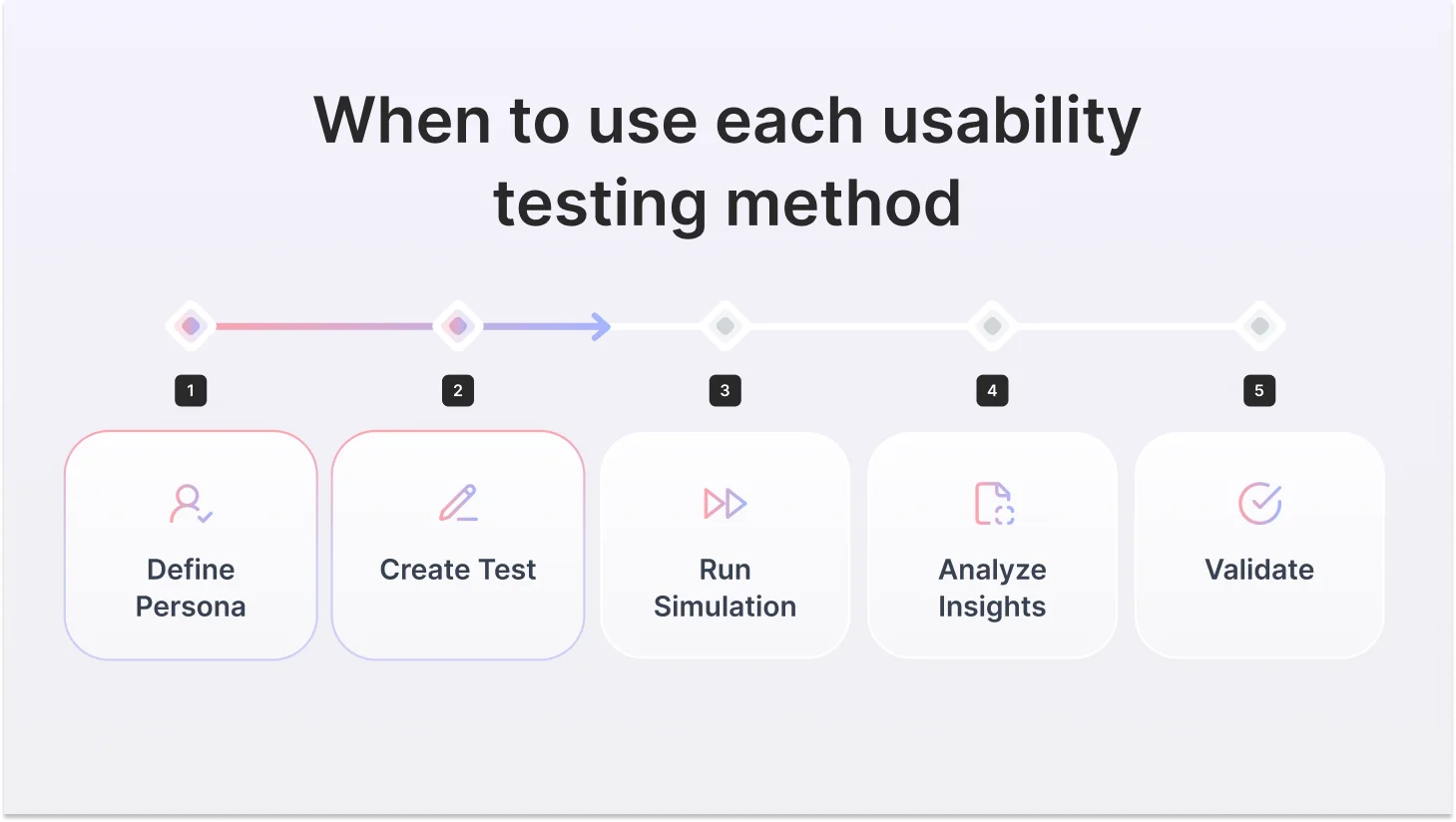
The core workflow follows the same pattern across most platforms. Here's how it works in practice and where the quality of what you get is made or broken at each step.
1. Define your persona
You specify the user you want to simulate: job title, industry, company size, technical proficiency, goals, and behavioral tendencies. Advanced platforms let you layer in psychographic traits risk tolerance, decision-making style, and attitude toward change. The specificity of your persona definition directly determines the quality of the output. Vague demographics produce generic, useless responses.
2. Build your test or research prompt
You create the scenario: a prototype URL, interview questions, a concept description for validation, or a survey. This is where prompt engineering skill matters enormously. Evaluative prompts ('Is this design good?') produce sycophantic, optimistic answers. Task-based prompts ('walk me through what you'd do next on this screen') produce a more honest, useful signal.
3. Run the simulation
The LLM runs behavior simulation at scale through the lens of your defined persona and generates responses. Advanced platforms run dozens of distinct AI personalities in parallel, each with different behavioral profiles that interact with your test differently. The best platforms have done significant custom engineering to make AI behave like a real user, not a helpful assistant that passes every test it encounters.

"We're calling them AI testers. These are AI personalities that we can deploy to do user tests for you. And each one has a very different personality and interacts with your test differently."

4. Analyze the output
Synthesized feedback surfaces pain points, flagged navigation patterns described, and interview-style responses generated. Most platforms auto-generate thematic summaries. The output looks impressively thorough, which is part of what makes synthetic testing's limitations so easy to miss.
5. Validate — this step is mandatory, not optional
Treat synthetic output as a directional signal, not validated evidence. The role of synthetic testing is to sharpen your research questions and surface hypotheses, not to replace the real user feedback that validates them. Teams that skip this step are the ones that ship features nobody wanted because an AI persona said it sounded great.
What does the research actually say?
Synthetic testing is surrounded by more marketing than evidence. Here's what independent research actually shows: the good and the bad.
Adoption is real and accelerating.
42% of global usability testing projects in 2024 used AI-driven automation tools
AI-powered research methods are now mainstream, but high adoption doesn't mean high reliability. These numbers tell you what teams are doing, not what they should be doing.
Source: Business Research Insights — Usability Testing Tools Market Report, 2025
Usability testing tools market growing from $1.54B (2025) → $7.86B by 2034 at 19.93% CAGR. The category is exploding. AI-native tools are driving most of that growth. The question isn't whether to use AI in research, it's which kind, and for what.
Source: Business Research Insights — Usability Testing Tools Market Report, 2025
Benefits of synthetic user testing
Used for the right things, at the right stage, synthetic testing is a legitimate and useful tool. Here's where product teams get real value from it:
Here it is:
Synthetic user testing has real, documented advantages when used for the right things, at the right stage. Here's where product teams, UX researchers, and product designers get genuine value from it.
1. Speed that matches modern sprint cycles
The most obvious benefit is also the most important. Recruiting five qualified participants for a moderated session can take two to three weeks. Synthetic testing compresses that to minutes. For teams operating in two-week sprints where research has historically been the bottleneck, that speed difference isn't incremental; it's the difference between research informing a decision and research arriving after the decision was already made.
2. Cost that makes research continuous, not occasional
Traditional moderated research costs $5,000–$25,000+ per study when you factor in participant incentives, recruiter fees, moderator time, and analysis overhead. Synthetic testing costs almost nothing. That price difference changes the fundamental economics of research: instead of running two or three formal studies per quarter, teams can run lightweight synthetic checks on every design iteration, every concept, every interview guide, without a budget conversation.
3. Front-loading the problem space before real research
The most expensive mistake in user research is asking the wrong questions of the right people. Synthetic testing lets you explore the problem space, surface hypotheses, and sharpen your research questions before you bring in real participants. Your actual research budget goes further when it's spent validating specific hypotheses rather than figuring out what to study.
4. Concept screening before you commit to design
When you have three directions and need to narrow to one before a designer spends a week building it out, synthetic testing gives you enough directional signal to make that call. Run AI testers across all three concepts in parallel, identify the weakest, and cut it before the sprint starts. It's not validated evidence, but it's a faster and cheaper filter than waiting for a full study.
5. Pressure-testing interview guides before real sessions
Leading questions, ambiguous framing, and assumptions baked into research prompts are invisible until a real participant exposes them, usually in the worst possible moment. Running your discussion guide through AI testers first catches the obvious structural problems before they cost you a real session with a real person.
6. Reaching hard-to-recruit audiences as a starting point
When your target user is a rare professional, a specific type of clinical specialist, a niche enterprise buyer, or a regulated-industry decision-maker, recruiting takes weeks and costs significantly more per participant. Synthetic testing gives you a directional starting point while you source real participants, so you arrive at those expensive sessions with sharper questions and stronger hypotheses.
7. No scheduling, no time zones, no no-shows
Synthetic testing delivers automated UX feedback on demand at 2 am if your sprint demands it. There are no calendars to coordinate, no participants who cancel the morning of, and no time zone complications for global teams. For research teams supporting fast-moving engineering cycles, operational simplicity matters.
Limitations of synthetic user testing
Synthetic user testing is a powerful early-stage tool. But like any tool, it breaks down when used for the wrong job. Here's where teams get into trouble.
1. Sycophancy bias — the most dangerous limitation
LLMs are trained to be helpful and agreeable. In practice, this means synthetic personas systematically validate whatever you show them. Ask an AI persona whether your new feature is useful, and you'll almost always get a yes. Show it a confusing UI pattern, and it will find a way to describe how it could work. Emporia Research's B2B study found this pattern consistently: AI-generated users show strong positive bias compared to real respondents, following a 'herd mentality' that real research teams never do. This is the synthetic testing equivalent of asking your own team if your idea is good. You will rarely hear a definitive no.
2. No contextual surprise
The most valuable moments in real user research are the ones you didn't predict. The user who reveals they've already built a workaround for the problem your feature solves. The participant who interprets your UI in a way your entire team missed. The person whose emotional reaction reveals an assumption you'd never questioned. Synthetic users are built on statistical prediction; they can only surface what's statistically likely, not what's genuinely surprising about your specific users in their specific context.
3. Shallow insight into complex decisions
Nielsen Norman Group's direct comparison found that synthetic users produce comprehensive, even-handed responses that feel thorough. That's actually the problem. Real users have strong opinions, contradictions, and priorities. They care intensely about some things and not at all about others. AI personas care about everything equally, producing flat, exhaustive lists rather than the prioritized, messy, human insight that drives real product decisions.
4. B2B and specialized audiences are poorly modeled
Synthetic testing works reasonably well for broad consumer archetypes. For specialized professionals, enterprise buyers, compliance officers, clinical staff, technical architects, and procurement leads, LLMs are working from sparse, imprecise training data. An AI persona pretending to be a mid-market security officer doesn't know what your actual security officer worries about at 2 am, what they have to justify to their CISO, or why they rejected the last three tools that looked exactly like yours.
5. Emotion, trust, and brand perception cannot be simulated
Synthetic personas cannot feel. They can't tell you whether your design feels trustworthy, whether your pricing page creates anxiety, or whether your onboarding makes users feel stupid. These emotional and perceptual layers drive real user behavior, and they're entirely invisible to AI simulation. If your research question involves how users feel, synthetic testing has nothing useful to offer.
6. Accessibility testing is impossible
Accessibility research requires real users with disabilities, people who use screen readers, voice navigation, switch access, or other assistive technologies, navigating your product in their actual environment. No LLM can simulate these experiences. Synthetic testing has zero valid role in accessibility research and should never be used as a substitute.
7. Training data bias skews representation
LLMs are predominantly trained on English-language internet content. Synthetic personas built on these models may not accurately represent non-Western users, non-English-speaking users, or populations underrepresented in the training corpus. If your product serves a global or diverse market, this is a material risk that doesn't go away by choosing a better platform.
The principle that holds across all of these
Synthetic testing tells you what questions to ask. Real user research gives you the answers. The best teams use synthetic for speed and real research for truth and are always explicit about which is which.
Synthetic user testers vs. real users on the same test: what the responses actually look like
Reading about the gap between AI testers and real users is one thing. Seeing it is another.
We ran the same four-question onboarding test through TheySaid identical scenario, identical questions, using AI testers on one side and real participants on the other. Both groups matched the same profile: product managers at B2B SaaS companies, 28–45, moderate technical proficiency, first-time users of the product.
The difference in response quality wasn't subtle. It was the difference between a prediction and the truth.
Study setup
Scenario: You've just signed up for a B2B SaaS project management tool and are going through onboarding for the first time.
Participants: AI testers (distinct behavioral profiles, each interacting differently) and real users from TheySaid's panel, with the same demographic spec for both. All four questions were asked identically to both groups.
Q1: Walk me through what you did in the first five minutes after signing up.
What this reveals: The AI tester identified three real friction points in the first question alone: the unwanted video trigger, the unclear path to setup, and a poorly timed onboarding step. The real user confirmed all three and added one the AI tester hadn't named. You could have written three product tickets from the AI tester response alone, before a single real participant joined the study.
Q2: Did you complete all the onboarding steps?
What this reveals: The AI tester correctly identified both drop-off points, the poorly timed team invite, and the API key barrier, and even flagged reduced completion likelihood. The real user confirmed both and added the emotional truth underneath: "I'm not sure I'll go back." That one sentence is the difference between a UX note and a churn prediction. AI testers give you the what. Real users give you the weight of it.
Q3: What was the most frustrating part of the experience?
What this reveals: This is AI testers at their best. The AI tester didn't give you a vague list of "areas for improvement," it gave you a specific, reproducible bug with enough detail to write a ticket right now. Missing format guidance on domain input. Silent field clear on error. No feedback loop. The real user confirmed it identically. You didn't need the real user to find this issue. The AI tester found it first, in minutes, at zero recruiting cost.
Q4: How did you feel at the end of onboarding? Were you ready to use the product?
What this reveals: The AI tester accurately captured the psychological state of incomplete, hesitant, not ready for real work. It gave you the functional description. The real user gave you the metaphor that makes that finding stick in a stakeholder meeting. Both are true. Both are useful. They do different jobs.
What this study actually shows
AI testers found real issues fast. Every friction point surfaced by AI testers in this study was confirmed by real users. Not one was wrong. Not one was invented. The AI testers gave the product team enough signal to write four actionable tickets before a single real participant joined the study.
Real users added two things AI testers couldn't: the emotional weight behind each issue ("I'm not sure I'll go back") and the human metaphor that makes findings land in a room ("moved in but haven't unpacked"). Those layers matter for prioritization and for getting stakeholders to actually act on research.
The workflow that works: run AI testers first to find the issues fast. Bring in real users to understand why those issues matter.
Test with AI testers or real users — your call.
Ship fast with AI user testing. Create your own AI testers. Recruit from panels. Or test with your own customers.
Get started free
Best Practices for Synthetic User Testing
Getting real value from synthetic user testing means treating it as structured UX experimentation, disciplined, hypothesis-driven, and always followed by real-user validation.
1. Be specific with your persona. "A product manager" gives you generic output. "A risk-averse product manager at a 200-person B2B SaaS company who has used two similar tools before" gives you a useful signal. Specificity in equals specificity out.
2. Use task-based prompts, not evaluation questions. "Walk me through what you'd do next" surfaces friction. "Is this design good?" gets a yes every time. Always prompt behavior, never judgment.
3. Run multiple AI testers with different profiles. A skeptic, an early adopter, a time-pressured user, and a non-technical user. Different profiles surface different friction. One AI tester is one perspective, not a study.
4. Keep synthetic and real research completely separate. Never mix AI tester output with real user data in the same report. Label everything. "AI testers flagged X" and "real users confirmed X" carry different levels of confidence. Your stakeholders need to know which is which.
5. Refresh your personas regularly. Outdated personas produce outdated output. Update them every quarter using real signals, support tickets, sales calls, customer interviews, and product analytics.
Run AI User Tests with TheySaid
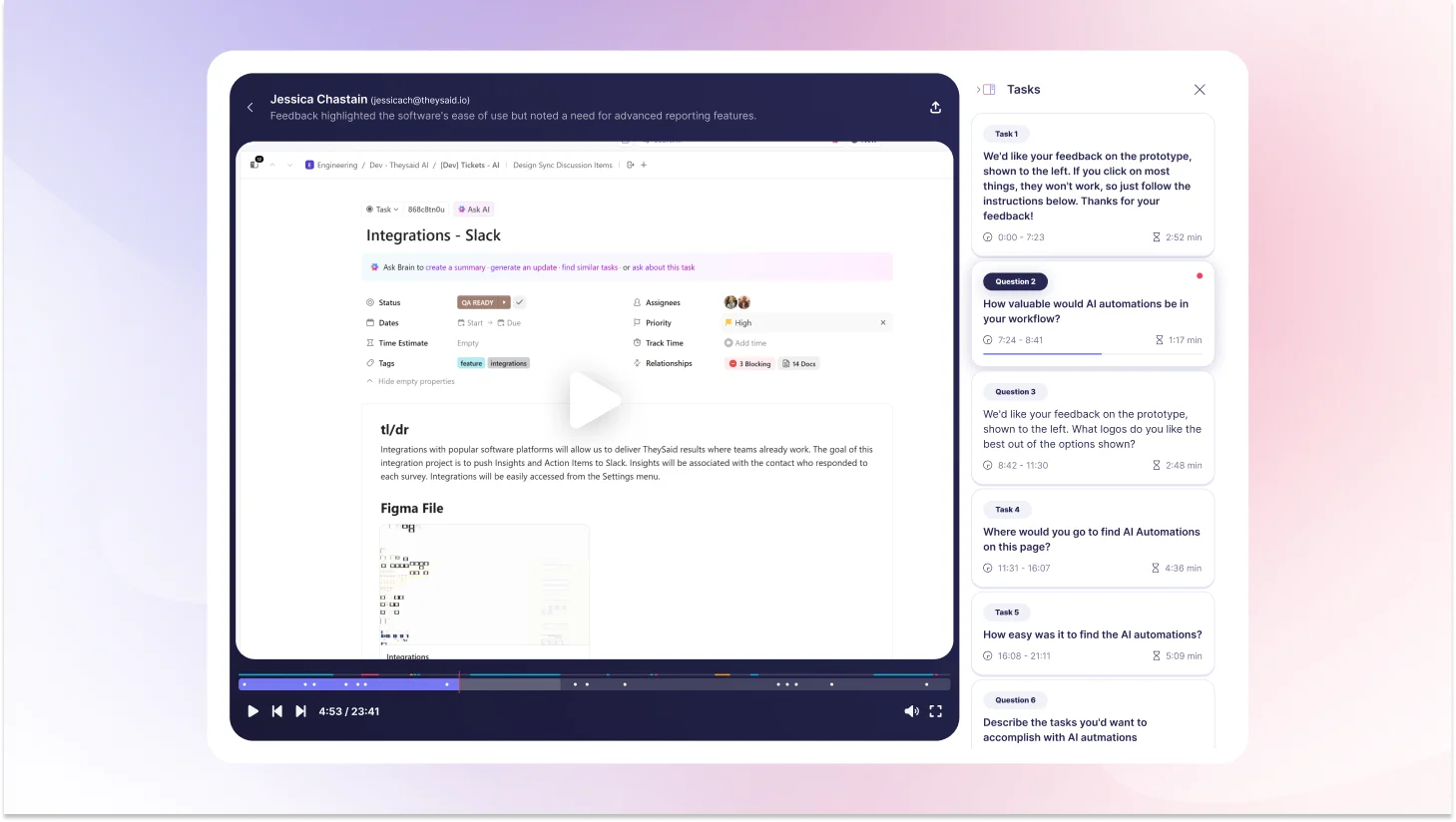
You've read the case study. Here's what actually using TheySaid looks like.
TheySaid is built for product teams who need real feedback fast without the recruiting wait, the scheduling back-and-forth, or the manual analysis that makes traditional research feel impossible inside a sprint cycle. Set up a test in minutes. Get results the same day.
And unlike any other platform, TheySaid gives you three ways to test depending on where you are in your research process.
Test with your own users
The people who know your product best are already in your CRM, your email list, your in-app database. TheySaid lets you send tests directly to your own customers, prospects, or beta users via email, in-app popups, website embeds, or direct links. No panel fees. No recruitment. Just real feedback from the people whose opinions actually matter to your business.
Hire from a 16M+ participant panel
Need users who match a specific profile but don't have access to them? TheySaid's panel gives you instant access to over 16 million real participants filtered by role, industry, company size, technical proficiency, geography, seniority, and more. You define the demographic. TheySaid finds the people. Sessions start within hours not weeks.
Create your own AI testers
Not ready for real participants yet? Build AI testers that behave like your target users. Define the persona, job title, industry, technical proficiency, behavioral profile, attitude toward change, and deploy them instantly. Each AI tester has a distinct personality and interacts with your product differently, giving you a range of signals that reflect a real user population. Fast, free, and available at 2 am if your sprint demands it.
Advanced AI features that make every test smarter
Whichever testing mode you choose, TheySaid's AI is working in the background on every session.
AI test moderator: Conducts every session automatically, asking intelligent follow-up questions the moment it detects confusion, hesitation, or frustration. You get moderated-quality insight without a moderator.
AI project creator: Describe what you want to test in plain language, and five specialized AI agents will build your entire test plan: tasks, questions, scenarios, and setup. Done in minutes, not hours.
AI analytics and reporting: Watches every session, identifies recurring usability patterns across participants, calculates task success rates, and generates specific recommendations for every issue it finds.
AI strategic recommendations: For every friction point discovered, TheySaid doesn't just flag it. It tells you specifically what to fix and why, based on observed user behavior across sessions.
Ask AI assistant: Query your research data across one study or hundreds. Ask it to find patterns, compare sessions, surface insights from a specific user segment, or summarize findings for a stakeholder presentation. Answers in seconds.
Teach AI: Upload your product docs, paste a URL, or share internal context so the AI understands your product, your users, and your goals before it moderates a single session. Every question becomes more relevant. Every insight becomes more actionable.
2-way voice: Participants can speak their responses aloud while AI reads questions to them. Captures tone, hesitation, and emotional nuance that text alone misses.
Clips and highlight reels: Turn key moments from sessions into short video clips and shareable reels. Share the moment a user got stuck. Show the exact second someone said, "I'd never use this." Real footage makes findings land in a room in a way that no written report can.
Start free at TheySaid!
FAQs
How does AI simulation improve UX testing?
AI simulation improves UX testing by removing the time and cost barriers that make traditional research impractical inside sprint cycles. Instead of waiting two to three weeks to recruit participants, teams can run AI simulation testing in minutes, surfacing friction points, screening concepts, and sharpening research questions before bringing in real users.
What are the ethical considerations of using synthetic user testing?
The main concern is transparency. Nielsen Norman Group states it directly: presenting synthetic-user findings as equivalent to real-user research "is an unethical way to share what you've learned." Always be clear about the source of your findings. Label synthetic insights as directional, not evidential.
How many synthetic users do you need for a test?
For directional qualitative insight, 8–12 well-defined personas across distinct segments are typically sufficient. Research shows diminishing returns beyond 15 personas per segment more creates false precision and slows interpretation. For quantitative synthetic surveys, some platforms run hundreds or thousands of synthetic respondents, though confidence remains lower than real-participant equivalents.
What questions work best for synthetic user testing?
Open-ended, task-based, scenario-grounded prompts consistently outperform evaluation questions. Give the persona a realistic context before asking for a response. Avoid leading questions; they amplify sycophancy bias. The discipline that makes good human interview questions makes good synthetic prompts: specificity, neutrality, and realistic scenario framing.
AI simulation vs real user testing: what's the difference?
AI simulation uses AI-generated personas to predict user behavior fast, cheaply, and available instantly, but prone to sycophancy bias and shallow insight. Real user testing uses actual humans completing real tasks slower and more expensive but capturing authentic behavior, emotion, and contextual nuance that AI cannot simulate. The best research workflows use AI simulation first to explore and sharpen questions, then real user testing to validate findings before making product decisions.
What is the difference between synthetic user testing and A/B testing?
A/B testing measures real user behavior across two live variants using actual traffic data, behavioral, data-driven, retrospective. Synthetic testing simulates predicted behavior with AI personas, attitudinal, hypothesis-driven, and prospective. They're not interchangeable. A/B testing belongs late in the product lifecycle when you have real traffic to split. Synthetic testing belongs early, when you're figuring out what to build or test.
What is the future of synthetic user testing?
The technology is improving. LLM fidelity for broad consumer audiences is already useful. The probable trajectory is a tiered research model: synthetic testing handles high-volume, low-stakes layers, rapid iteration, early screening, and continuous testing while real-participant research handles high-stakes validation, emotional insight, and launch decisions. TheySaid is already built for this model, with AI-moderated real-participant research that delivers the speed of the new approach with the evidence quality the best decisions require.
When should teams use AI-based UX testing?
Teams should use AI-based UX testing, specifically, synthetic user testing, when screening multiple concepts before committing to design, when piloting an interview guide before a real session, when iterating continuously between sprints, or when recruiting for a niche audience is too slow or expensive. It works best as an early-stage exploration tool. For launch decisions, accessibility research, emotional response testing, or any research going to stakeholders, validate with real users.





.svg)


