
Meet your audience wherever they are
How It Works
Set up once, share everywhere, and all responses collected in the same project.

How It Works
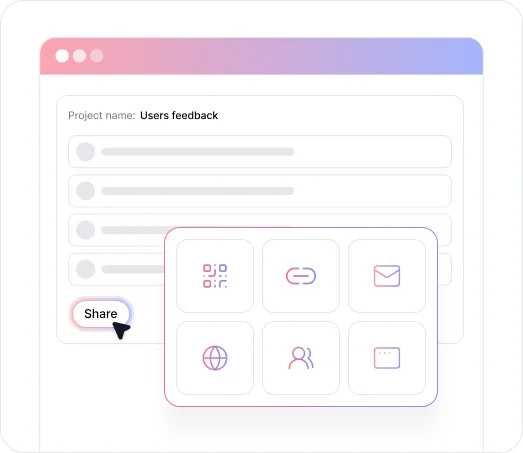
Once your project is published, click the Share button on your AI Projects page to open the publish menu. From there, select your distribution method from the Embed Method dropdown.
Each method generates the appropriate format for your channel: a copyable link, a downloadable QR code, an HTML embed code, or a panel provider URL. All methods route responses into the same project, so your data stays unified regardless of how many channels you use.
Key Benefits
Discover what you can do with TheySaid's survey sharing options.

Share via Direct Link
Copy your project's unique URL and paste it anywhere: email signatures, SMS, newsletters, chat apps, or social media. The shareable link works across every platform without any additional setup.

Embed Into Email Campaigns
Select an email provider from the Embed Method menu to generate an HTML code snippet. Paste it directly into your email template to embed the survey inline, so recipients can respond without leaving their inbox.

Generate a QR Code
Select QR Code from the Embed Method dropdown and click Download. Use the QR code in print materials, event signage, websites, newsletters, or anywhere you want to give instant mobile access to your survey.

Embed Into Your Website or App
Select Website from the Embed Method dropdown and choose iFrame from the Popup Style menu. TheySaid generates an HTML snippet to paste into your website or in-app guide, including product walkthroughs built with tools like Pendo or WalkMe.

Share on Social Media
Any project can be shared on social media using its shareable link. For AI Polls specifically, TheySaid also offers built-in one-click posting — select Social Media from the Embed Method dropdown, choose your platform, and click Share to open Facebook or LinkedIn with the post auto-drafted for you.
Ready to reach your audience where they are?
See what customers say about our AI user testing platform





FAQs
TheySaid offers multiple multi-channel survey distribution methods: shareable links, email embed codes, QR codes, website iFrame embeds, panel provider URLs, and social media sharing for AI Polls. All methods route responses into the same project for unified analysis.
Yes. You can distribute the same project across multiple channels simultaneously. Each method generates its own format but all responses feed into the same project, so your data stays in one place regardless of how many channels you use.
Select Email from the Embed Method dropdown and choose your email provider such as Hubspot. TheySaid generates an HTML code snippet you can copy and paste into your email template, embedding the survey directly into the email.
Select Website from the Embed Method dropdown and choose iFrame from the Popup Style menu. TheySaid generates an HTML code snippet to paste into the head of your website or in-app guide. This works well for embedding surveys into product walkthroughs built with tools like Pendo or WalkMe.
Select QR Code from the Embed Method dropdown in the publish menu, then click Download. The QR code links directly to your published project and can be used in print, at events, or anywhere participants can scan with a phone.
The panel option is for teams using third-party participant recruitment services like Cint, DashMR, or RepData. It generates a provider-specific URL and lets you configure redirect links for different survey outcomes including completion, over quota, quality control failures, and termination.
Yes. Any project can be shared on social media by copying the shareable survey link and posting it manually. AI Polls also include built-in one-click posting that opens Facebook or LinkedIn and auto-drafts the post for you.
One project.
Every channel.
Share via link, email, QR code, website embed, or social media. Every method routes responses into the same project so your data stays unified no matter how many channels you use.


TheySaid User testing recommends questions, delivers via your existing channels, engages your audience,and summarizes results through AI user testing, surveys, and interviews.
.svg)


