




Think about the last time you received a survey in your inbox. You might have opened it, meant to respond to it, but then completely forgotten about it.
That’s exactly what happened to surveys sent through email. They often get lost in a crowded inbox or are overlooked in a busy day, but receiving no response does not necessarily mean a lack of interest. Sometimes people just need a little reminder that says, “Hey, we’d still love to hear from you.”
Yet despite how simple it sounds, nearly 80% of businesses never send a survey reminder email.
That’s a missed opportunity.
A single follow-up email increases response rates, boosts customer engagement, and fosters a sense of connection by demonstrating that people's opinions matter.
In this guide, you’ll also find ready-to-use survey reminder email templates, real examples, and timing tips to help you increase response rates without annoying your audience.
TL;DR
- Survey reminder emails increase response rates by nudging people who intended to respond but forgot.
- The best results come from sending reminders 42–78 hours after the first email and limiting follow-ups to 1–3 total.
- High-performing reminder emails use human subject lines, clear CTAs, light personalization, and respectful tone.
- Ready-to-use templates for first, second, and final reminders save time and reduce guesswork.
- Avoid common mistakes like sending too many reminders, sounding urgent, or repeating the same message.
- Automating survey reminders helps teams stay consistent, save time, and collect more reliable feedback.
What Is A Survey Reminder Email?
A survey reminder email is a follow-up message sent to people who haven’t completed a survey after the initial invitation. Its goal is to gently nudge recipients to respond, helping increase survey response rates without overwhelming them.
For example, you might send a survey reminder:
- When a customer has not responded to your feedback request
- A few days after you send an employee engagement survey
- During product research campaigns to nudge test users
- To re-engage attendees after an event
- After a forest response to dig deeper with a follow-up question
Recommended read: 18 Survey Email Templates to Boost Response Rates
Why Survey Reminder Emails Increase Response Rates
Survey reminder emails work because they act as a behavioral nudge, not a demand. Most recipients don’t intentionally ignore surveys; they simply get distracted or plan to respond later.
A well-timed follow-up brings the survey back to the top of the inbox, reduces forgetfulness, and lowers the effort required to take action. This is especially effective for busy audiences like customers, employees, or B2B clients.
When written politely and sent at the right time, survey reminder emails increase response rates without causing frustration or survey fatigue.
Read: 18 Survey Email Templates to Boost Response Rates
What to include in a Survey Reminder Email?
A survey reminder email should be short, polite, and strike the right balance between being informative and encouraging them to take action. Here’s what to include in the remainder email:
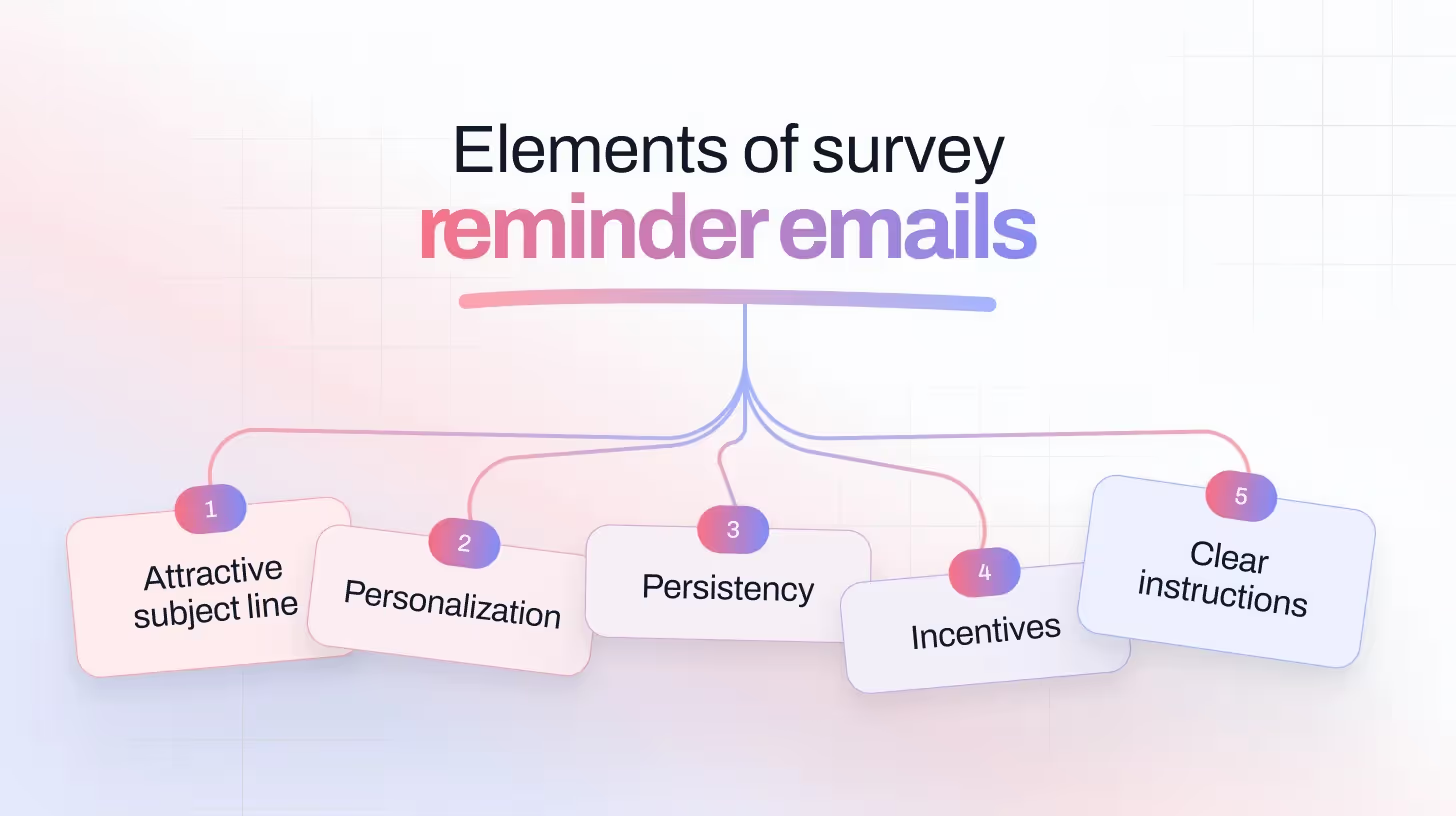
Friendly subject line: A clear subject line helps the reader understand the email's content immediately.
Personal Greeting: Warm greetings make your email personal and practical.
Polite Reminder Message: Remind them of the purpose without overwhelming them.
Specific Action: Clearly told them exactly what to do.
Thank You Note: Make them feel appreciated and valued.
When to Send Survey Email Reminders?
Timing is very important when sending survey email reminders. Send them too early, and respondents will annoy you. Send them too late, and you'll miss the opportunity.
According to research, the ideal time to send a reminder email is between 42 and 78 hours after the initial invite. If your response is too low, you can send a second reminder email after a few days, but keep it light. Too many follow-ups can lead to unsubscribes or survey fatigue.
More Send-Time Optimization Tips:
- Monday is a great day to send surveys with the highest response rates.
- Saturday is the worst, often buried in weekend noise.
- The ideal time to send the remainder email is between 11:00 AM and 12:00 PM, when most people check their inboxes.
- Avoid sending messages late at night or early in the morning (9:00 PM to 7:00 AM)—they’re often ignored.
Ideal Timing Based on Context:
How Many Survey Reminder Emails Should You Send?
Most surveys perform best with one to three reminder emails, depending on the audience and survey length.
- 1 reminder works well for short surveys or highly engaged audiences
- 2 reminders are ideal for customer or employee feedback surveys
- 3 reminders can be effective for longer surveys, but only when spaced out and written politely
Sending more than three reminders increases the risk of survey fatigue, unsubscribes, and lower trust. The goal is to nudge, not pressure, recipients into responding.
Best Practices for Writing Effective Survey Reminder Emails
Once timing, frequency, and templates are set, small execution details make the biggest difference in survey reminder email performance.
Follow these best practices to improve response rates without overwhelming your audience:
Lead with a Human, Irresistible Subject Line
The subject line determines whether your survey reminder email gets opened at all. Effective reminder subject lines feel conversational, focus on value, and avoid pressure-heavy language.
Reminder Email Subject lines examples:
- Got 2 minutes? Your feedback means the world.”
- “Tell us what you think & get 20% off.”
- “You’re invited: Share your thoughts with us.”
- “Help us improve (plus a little thank-you inside)”
- Reminder: Survey closes in 2 days
- Final call to share your feedback
- 20% off for your feedback? Yes, please.
- Got 3 mins? Get a $10 gift card
- Share your opinion, get rewarded
- You still haven’t told us what you think…
- Something missing? You tell us.
- Can we do better? You decide.
- Did we get it right?
Personalize Beyond the First Name
Adding a name in the survey email is just a start. Personalize your email message by reminding people of why you are reaching out to them. Mention the product they purchased, the event they attended, or the service they interacted with. Show them this email is especially for them.
Example:
Follow Without Being Pushy
While follow-up survey emails need to be consistent and motivating, there’s a fine line between persistence and annoyance. Sending too many reminders can easily overwhelm your customers. That’s why it’s best to stick to a recommended number of follow-ups, enough to encourage action, without making them feel bombarded.
Add an Incentive (When It Makes Sense)
To boost your survey response rates, even a small reward can boost completion rates, especially for longer or more complex surveys. Think:
- Discount code or freebie
- Entry into a giveaway
- Early access to new features
- Charitable donation in their name
Recommended read: 50+ Survey Email Subject Lines That Actually Get Clicks
Survey Reminder Email Examples for Each Follow-Up Stage
First Reminder (Day 3–4)
Second Reminder (Day 6–7)
Final Reminder (Day 9–10)
Survey Reminder Email Templates by Use Case
Unopened Initial Email
Opened Email, But Didn’t Click
Loyal Customers or Engaged Users
Post-Purchase Feedback Reminder
Employee Feedback Survey Reminder
To a Churned or Inactive User
B2B Client Check-In
NPS (Would You Recommend Us?)
CSAT (Customer Satisfaction) Reminder
Recommended read: How to Embed a Survey in an Email (Step-by-Step Guide)
Common Survey Reminder Email Mistakes to Avoid
Even well-written survey reminder emails can underperform if a few common mistakes creep in. Avoiding these issues helps protect response rates and audience trust.
Sending too many reminders: More than three follow-ups often leads to survey fatigue, unsubscribes, and lower long-term engagement.
Using pressure-heavy language: Phrases like urgent, final notice, or act now can feel pushy and reduce goodwill.
Repeating the same message every time: Each reminder should feel slightly different, adjust tone or framing instead of resending the same email.
Making the survey feel time-consuming: If a survey is short, say so. Unclear time expectations reduce clicks.
Forgetting to explain why feedback matters: People respond more when they understand how their input will be used.
Build a Survey, Email It, and Automate Survey Email Reminders Using TheySaid
Surveys are only powerful when people actually respond. And that’s where most tools stop short, but TheySaid doesn’t.
With TheySaid, you can build smart, conversational AI surveys in minutes — no design or tech skills needed. Then, with just a click, send them via email to your audience.
But here’s the magic: TheySaid also handles all the behind-the-scenes work. From personalized reminders to analyzing every response with AI, it helps you get more feedback and more meaning from it, without chasing people or guessing what went wrong.
Start your survey now — it’s free to try!
FAQs
Does sending survey reminder emails violate email compliance laws?
Survey reminder emails are generally allowed under laws like CAN-SPAM and GDPR as long as recipients originally opted in, the purpose is clear, and an unsubscribe option is provided. Reminder emails should relate directly to the original survey invitation.
Should survey reminder emails be sent from a no-reply address?
No. Emails sent from a real sender address tend to receive higher trust and response rates. A recognizable sender name reassures recipients that the reminder is legitimate and human.
Do survey reminder emails work better for short or long surveys?
Reminder emails tend to be more effective for short surveys, but they can also improve completion rates for longer surveys when paired with clear time expectations or incentives.
Can survey reminder emails hurt brand perception?
Yes, if overused. Too many reminders or overly aggressive language can frustrate recipients. When reminders are limited, polite, and relevant, they generally improve engagement without harming brand trust.
Should survey reminder emails differ for B2B and B2C audiences?
Yes. B2B reminder emails often perform better with a professional, value-focused tone, while B2C reminders benefit from warmth, simplicity, and incentives. Audience context matters more than template choice.
Is it better to resend the same survey link or generate a new one?
It’s best to resend the same survey link so responses remain consolidated and analytics stay accurate. Generating new links can fragment data and complicate reporting.
Can survey reminder emails be automated without losing personalization?
Yes. Modern survey tools allow reminders to be automated while still using personalization fields such as name, activity, or event context, keeping emails relevant without manual effort.
How do I know when to stop sending survey reminders?
Stop reminders once the response rate plateaus or unsubscribe rates increase. Monitoring engagement signals is more effective than sending reminders on a fixed schedule.






.svg)


