




Every product team wants that reassuring feeling: users actually love what we’ve built. But getting honest feedback means choosing how to ask for it.
Do we go with moderated tests sitting together (maybe on Zoom) where a researcher guides participants in real time, asking follow-up questions? Or unmoderated tests, where users explore tasks on their own schedule, quietly recording their screen and thoughts?
Both UX research methods can provide valuable user insights, but they differ in terms of speed, cost, and the depth of feedback they produce.
In this guide, we’ll explain the key differences between moderated and unmoderated usability testing, and by the end, you will be able to decide which approach fits your team, workflow, and research goals.
Let’s get started!
Stop switching tools for every test
Run moderated and unmoderated user testing in one place. TheySaid gives your team the depth of live sessions and the scale of async tests, without the chaos of managing two separate workflows.
Start Testing Free
What is Moderated Usability Testing?
Moderated usability testing is a live, researcher-guided session where a participant works through a product, concept, prototype, or workflow while a trained moderator watches, listens, and asks questions in real time. Test sessions usually last 30 to 90 minutes, often with 5 to 8 participants per study (depending on your user groups), and they can happen in person or remotely over video call.
What really sets it apart is the human flexibility. It’s basically a thoughtful, controlled conversation. If a participant hesitates or does something unexpected, the moderator can pause and ask, “What’s going through your mind right now?” or follow an interesting thread that wasn’t in the original test script.
The ability to adapt in real time is the core strength of moderated testing. It allows researchers to stay present, explore unexpected behavior, and uncover the underlying reasons behind what users do.

“Good moderated testing is uncomfortable. It surfaces things your team didn't expect and didn't want to hear. If your Test sessions never challenge assumptions, something's off about how they're being run.”

Pros of Moderated Usability Testing
The following are the benefits of the moderated test sessions:
- Allowing the moderator to observe facial expressions, tone, and hesitation
- Helping researchers understand how users feel while interacting with the product
- Creating a conversational setting that encourages honest feedback
- Giving moderators the chance to ask follow-up questions in real time
- Making it easier to explore emerging usability issues during the session
- Working well with early concepts, wireframes, or paper prototypes
- Helping researchers understand the reasoning behind user actions
- Allowing moderators to clarify tasks if participants become confused
- Supporting the testing of complex workflows or multi-step tasks
- Revealing usability issues that simple task data might miss
Cons of moderated usability testing
Moderated sessions also have some limitations:
- More time is required to schedule and run live sessions
- Higher costs due to moderator time and participant incentives
- The moderator’s presence may influence participant behavior
- Results can depend on the moderator’s skill and experience
- Reviewing recordings and notes takes additional analysis time
- In-person studies may limit geographic reach
- Insights may take longer to synthesize after sessions end
When to conduct moderated usability tests?
Moderated usability testing is particularly useful in situations such as:
- Early-stage discovery: You don't know what you don't know yet
- Complex or low-fidelity prototypes that need explanation
- Sensitive topics where participant comfort matters
- When you need to explore the 'why' behind a behavior, not just the 'what'
- When your target users are not tech-savvy and may need guidance
What is unmoderated usability Testing?
Unmoderated usability testing removes the researcher from the session entirely. Participants receive a pre-written set of tasks and complete them independently, on their own schedule, through an online testing platform. Their screen is recorded, their clicks tracked, time-on-task measured, and in many cases, a think-aloud response captured. The researcher reviews all of this asynchronously after the sessions are complete.
A well-designed unmoderated study can be live in an afternoon and return results within 24 hours. Scale to 30, 50, or 100 participants at a fraction of the cost of moderated research. That sample size is what gives unmoderated user testing statistical credibility and why it's the dominant method for validation and benchmarking.
Pros of unmoderated usability testing
An unmoderated session’s benefits include:
- Collecting results quickly, often within hours or a day or two
- Being more cost-effective than moderated studies
- Allowing larger sample sizes without extra researcher time
- Reducing observer bias, since no moderator is present
- Letting participants test in their own environment and devices
- Running sessions simultaneously across time zones
- Providing quantitative metrics like task success rate or time-on-task
- Enabling global participant recruitment
- Being easy to run without a dedicated UX researcher
- Generating automated reports and insights on many platforms
Cons of unmoderated usability testing
Unmoderated sessions also have some limitations:
- Limited ability to understand why users behave a certain way
- Poorly written tasks can compromise the entire study
- Usually requires medium- to high-fidelity prototypes or live products
- Think-aloud feedback tends to be lighter without prompting
- User confusion can look similar to real usability problems in the data
- No non-verbal cues, such as tone or hesitation
When to conduct unmoderated usability tests
Unmoderated testing works well in situations such as:
- Validating a design hypothesis with a larger participant sample
- Benchmarking usability metrics like task success rate or SUS scores
- Testing across multiple regions or time zones at the same time
- Projects with tight budgets or quick timelines
- Post-launch evaluations where statistical confidence is important
Recommended read: Usability Testing Methods: What They Are and When to Use Them
AI-Powered User Testing
Run moderated and unmoderated tests with real users and get clear insights without manual analysis.
Start testing with TheySaid
Moderated vs unmoderated usability testing: Side-by-Side Comparison
Use this table as a quick-reference when deciding which method fits you:
How Product Teams Choose Between Moderated and Unmoderated Usability Testing
The most effective product teams rarely treat moderated and unmoderated testing as competing methods. Instead, they sequence them. By combining multiple research approaches to answer the same question, a process often called triangulation, teams can build findings that are both insightful and reliable.
A common pattern looks like this:
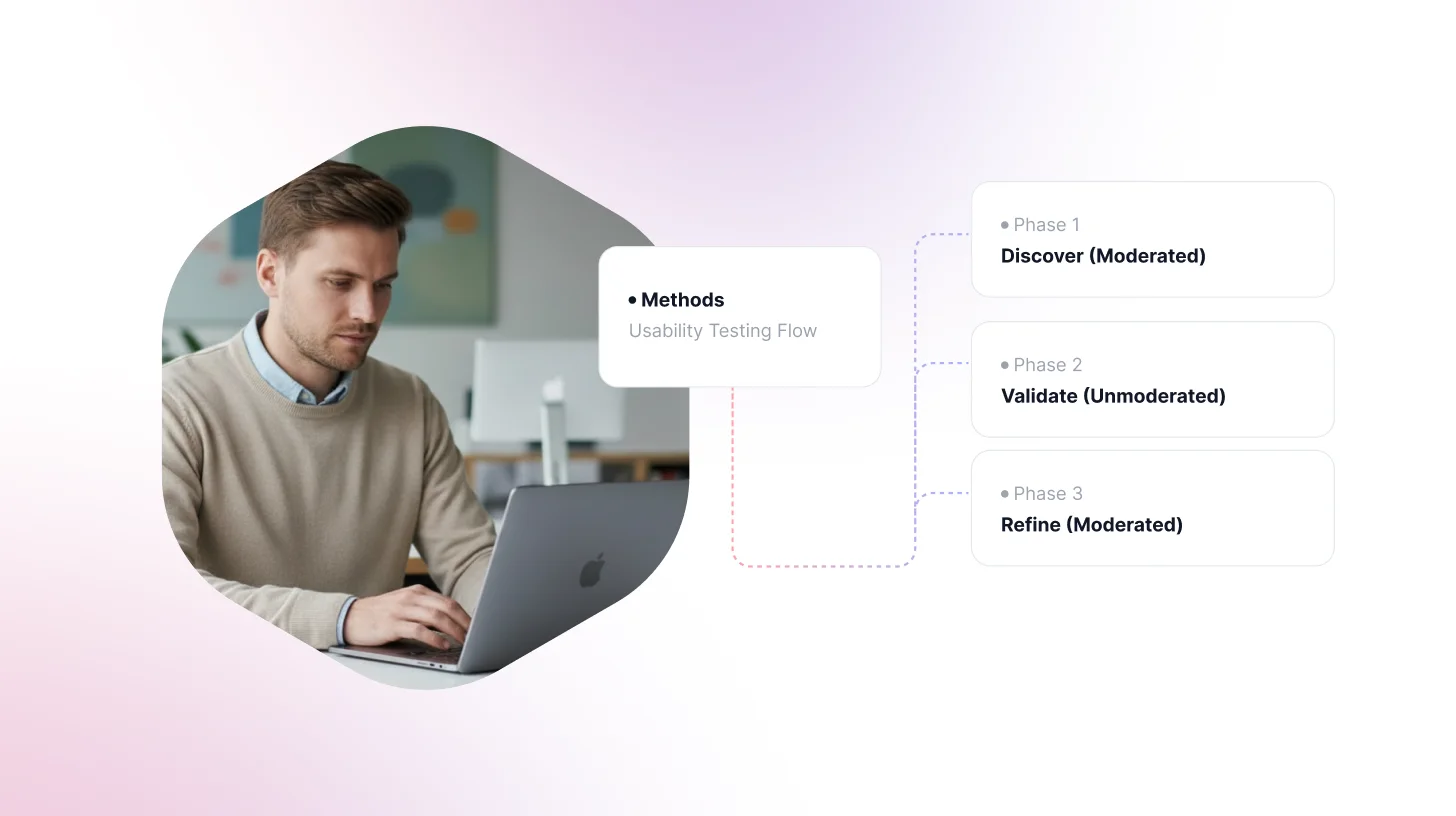
Phase 1: Discover
Start when the problem space is still open. Conduct 5–7 moderated sessions with participants who match your core user profile.
At this stage, the goal isn’t to test a polished design. You might use early concepts, wireframes, or simply a guided conversation. The focus is on understanding how users think.
Researchers typically look for:
- How users frame the problem or task
- Where their assumptions differ from the product’s logic
- The language they naturally use for features
- The underlying jobs they’re trying to accomplish
These sessions are primarily diagnostic, helping teams understand user mental models before building or testing solutions.
Phase 2: Validate
Once early patterns emerge, teams can design an unmoderated test grounded in those insights.
Using what you learned in Phase 1:
- Write clearer task instructions
- Target known friction points
- Test specific hypotheses
Deploy the study to 30–50 participants and collect structured UX metrics such as task success rates, time-on-task, or usability scores.
Because the study design is informed by earlier qualitative insights, the resulting quantitative data becomes much easier to interpret and act on.
Phase 3: Refine
Unmoderated studies often reveal unexpected results, a sudden drop-off, a task that takes far longer than expected, or a behavior that doesn’t match assumptions.
When that happens, run 3–5 focused moderated sessions to investigate the anomaly.
These sessions allow researchers to ask questions such as:
- What caused the hesitation here?
- What did the participant expect to happen?
- Why did they choose this path instead?
Moderated follow-ups provide the explanations that quantitative data alone can’t capture, closing the loop between behavioral data and user reasoning.
The key insight:
Moderated research makes unmoderated data interpretable, while unmoderated testing makes moderated insights scalable and defensible.
Making the Call by Position
For Product Managers
Unmoderated testing often fits well within sprint cycles, making it attractive for quick validation. However, using it too early can produce results that lack context.
If a feature idea has no prior qualitative research, start with 5 moderated sessions to understand the problem space. Once you have clear hypotheses, unmoderated testing becomes an efficient way to validate them at scale.
A simple rule many teams follow:
Use moderated sessions to reduce uncertainty, and unmoderated testing to measure outcomes.
For Product Designers
The fidelity of the prototype often determines the right method.
Low-fidelity designs usually work best in moderated sessions. Participants may need brief explanations, and confusion in unmoderated testing can easily look like a usability issue.
High-fidelity interactive prototypes that users can navigate independently are better suited for unmoderated testing.
Recommended read: What Is Prototype Testing? Definition, Types & Step-by-Step Process
A practical guideline:
If a participant needs even 30 seconds of orientation, the test is usually better run moderated first.
For UX Researchers
For researchers, the methodological decision is often straightforward. The real challenge tends to be organizational expectations.
Stakeholders often want large datasets, which favors unmoderated testing. Leadership teams, however, frequently make decisions based on user stories and qualitative insight, which moderated sessions provide.
Many research teams address this by building both methods into their research cadence:
- Unmoderated testing for continuous feedback between larger studies
- Moderated sessions for deeper exploration and strategic questions
Recent tooling has quietly changed the math on moderated research. Most researchers now use AI for transcription and synthesis, which used to take two days of analysis time, can wrap up in an afternoon.
Top Moderated and Unmoderated Usability Testing Tools
Choosing the right platform is almost as important as choosing the right method. Here's the current landscape:
Read: 10 Best AI User Testing Tools in 2026: Features & AI Capabilities Compared
How AI Is Changing Moderated and Unmoderated Testing in 2026
AI is starting to reduce one of the biggest hidden costs in user research: analysis time. For years, researchers spent hours reviewing recordings, tagging insights, and manually summarizing findings. Today, AI tools are speeding up that process significantly.
For moderated testing, the biggest impact is on synthesis. Automated transcription, theme detection, and smart tagging of important moments help researchers move from recordings to insights much faster. What once required days of manual review can now take only a few hours. Tools like Maze Interview Studies and Looppanel, for example, automatically highlight quotes, detect themes, and surface patterns across sessions.
For unmoderated testing, AI is starting to address the method’s biggest limitation: the lack of follow-up questions. Some platforms now introduce in-session AI prompts that ask additional questions based on participant behavior. Features like Maze’s AI follow-ups add a layer of contextual probing that previously required a live moderator. The gap between moderated and unmoderated testing is getting smaller, though it hasn’t disappeared completely.
Platforms like TheySaid take this a step further by bringing both approaches together. Teams can run moderated-style conversations, launch scalable unmoderated tests, and rely on AI to automatically surface key moments, themes, and insights.
Instead of spending hours reviewing recordings, researchers can focus on what matters most: understanding users and improving the product.
Start testing with TheySaid!
Recommended read: AI in User Testing: Every Question PMs and UX Researchers Actually Ask — Answered
FAQs
What is the main difference between moderated and unmoderated user testing?
Moderated user testing involves a live facilitator guiding participants through tasks in real time. Unmoderated testing has no facilitator; participants work independently and are recorded. The core difference: moderated reveals the 'why' through real-time conversation; unmoderated reveals the 'what' at scale and speed.
Which is better: moderated or unmoderated user testing?
Neither is universally better. The right method depends on your research stage and question. Use moderated testing when you need to understand user mental models, test low-fidelity concepts, or explore unknown territory. Use unmoderated testing when you need to validate specific hypotheses, benchmark usability metrics, or gather data from a large sample quickly. Most mature research programs use both in sequence.
What is the moderator effect in user testing?
The moderator effect refers to participants behaving differently when observed, typically with more effort, more positivity, and more deliberateness than in natural use. It's real but manageable. Skilled facilitators reduce it by: framing the session as a test of the product (not the person), using neutral language, reacting neither positively nor negatively to successes or failures, and following a consistent discussion guide across sessions.
Can I run unmoderated tests on a Figma prototype?
Yes. Tools like TheySaid are built specifically for Figma prototype testing. The caveat: participants must be able to navigate your prototype independently. If it has dead links, incomplete flows, or requires any explanation, dropout and confusion will be indistinguishable from real usability failure in the data. Either increase fidelity before running unmoderated tests, or validate the prototype's navigability with 2–3 moderated pilot sessions first.
Is moderated or unmoderated testing better for AI-powered products?
Moderated testing is generally more appropriate in early AI product development because user mental models around AI behavior are still forming and highly variable. When users don't understand what an AI feature is supposed to do, unmoderated tasks will produce inconsistent, low-quality data. Use moderated sessions to map those mental models first, then deploy unmoderated tests to validate specific interaction patterns at scale.
Can I run moderated and unmoderated tests on the same prototype?
Yes, and in many cases you should. Running moderated sessions first helps you tighten your unmoderated task scripts. You'll know where users get confused, which allows you to write better instructions and more precise tasks for the unmoderated study. The moderated sessions essentially QA your unmoderated study design.
What's the difference between remote moderated and in-person moderated testing?
Remote moderated testing via video conferencing tools (Zoom, Google Meet) gives you access to a geographically diverse participant pool and eliminates logistical overhead. In-person testing allows researchers to observe physical context body language, environmental factors, and device handling that cameras miss. For most digital product research, remote moderated testing delivers equivalent insight at a fraction of the cost.







.svg)


