



If you’re a product manager, product designer, or UX researcher, you already know this:
A single usability issue in a critical flow checkout, onboarding, or pricing can quietly reduce conversions by 20–40%.
Not because your product is bad. But because users get stuck, confused, or drop off before completing key actions.
The good news is that most of these issues are preventable.
Choosing the right usability testing method early helps you identify friction before it impacts revenue, retention, or user trust.
Below, you’ll find the most effective usability testing methods used by product teams today, mapped to real scenarios and decisions teams actually face.
Each method includes a clear decision trigger:
If this is the exact problem you’re trying to solve, use this method.
(For a broader breakdown of user testing types and methods, see our complete guide to user testing types.
Which Usability Testing Method Should You Use? The 60-Second Decision Framework (Save This Table)
Below is a breakdown of the most effective usability testing methods, along with real usability testing examples and when to use each one.
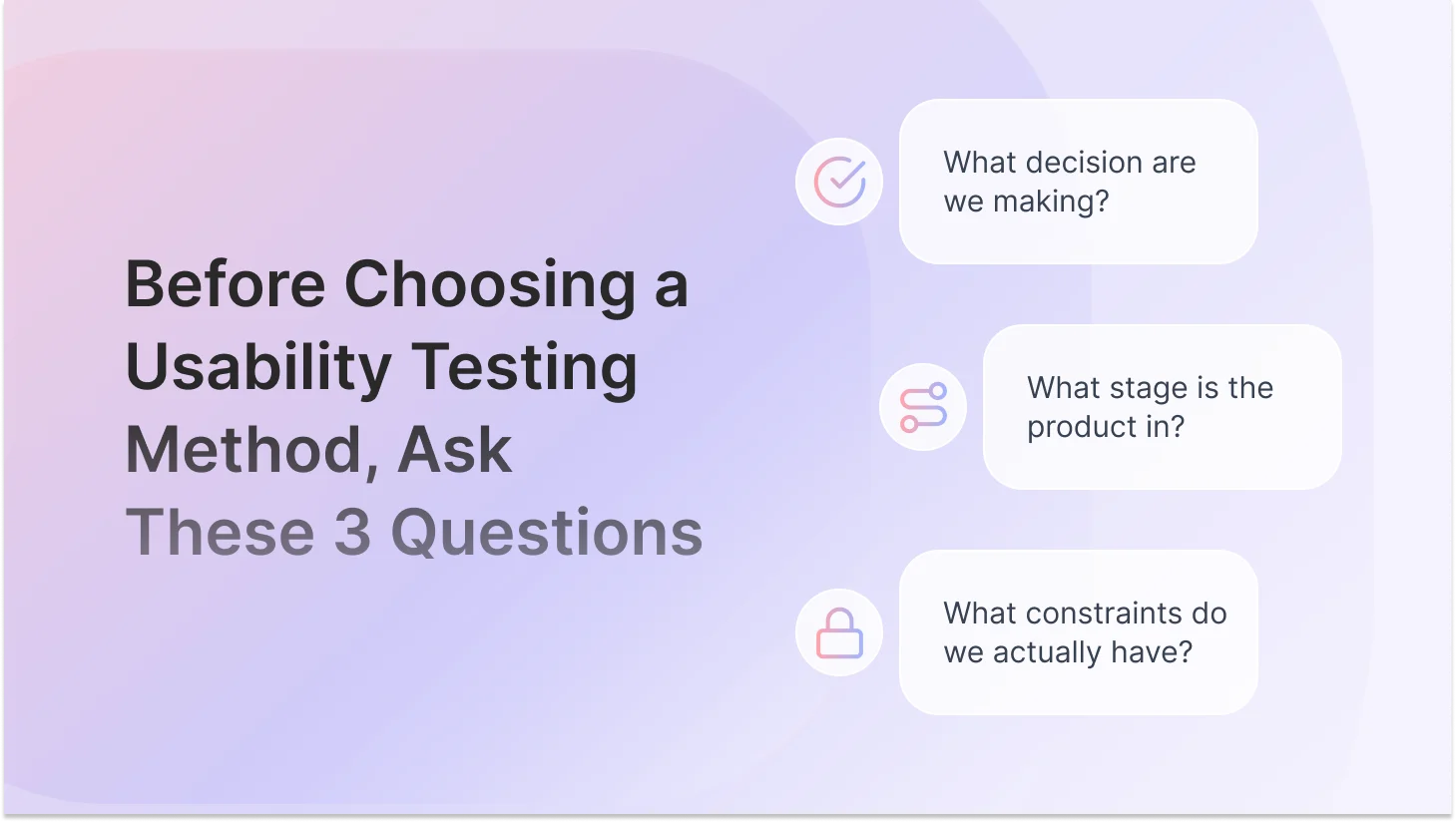
Before the Methods: The Three Questions That Actually Drive the Decision
Every wrong usability testing method choice traces back to skipping one of three questions.
Teams jump straight to 'let's do a usability test' before they've answered:
1. What decision needs to be made from this research?
This is not a research question, but an actual product decision. 'Should we redesign the navigation?' 'Does this onboarding flow work well enough to ship?' 'Which of these two checkout experiences should we build?' The decision comes first. Everything else follows from it.
2. What stage is the product in?
A live product with 50,000 daily active users calls for completely different methods than a Figma prototype that three people have seen. Stage determines what you can even test and what kind of data will be credible.
3. What are your real constraints?
Be honest. Budget, time, participant access, and team bandwidth. A 'right' method you can't actually run is just a good idea you'll never use. The best usability insight is the one you actually generate.
10 Most Effective Usability Testing Methods in 2026
These usability testing methods represent the most widely used UX research methods across product teams today, covering different types of usability testing for both early-stage discovery and post-launch optimization.
1. Guerrilla Usability Testing
Guerrilla testing is informal, fast, and low-cost. You grab whoever's available, friends, coworkers from another team, people in a coffee shop, show them your concept, wireframe, or prototype, and watch what happens. Among all usability testing methods, guerrilla testing is one of the fastest ways to validate early-stage ideas.
The decision it helps you make: 'Does this direction make any sense at all?' That's the question it answers.
Use it when: You're working with early-stage concepts or wireframes, have no budget for recruitment, are running out of time, or just need to sanity-check an assumption before investing in more formal research.
What it won't do: Give you nuance, statistical confidence, or insight into why something isn't working. It flags problems. It doesn't diagnose them.
2. Moderated Usability Testing
A researcher guides a participant through a set of tasks in real time, in person, or via video call. You watch, ask follow-up questions, and listen for the reasoning behind the behavior.
The decision it helps you make: 'Why are users confused, hesitating, or dropping off here?' It's the answer to the why. Not just whether users succeed or fail, but what's actually happening in their heads.
Use it when: You're pre-launch with a working prototype, you've spotted a pattern in analytics you don't understand, your team is deadlocked on a design direction, or the stakes of getting it wrong are high (complex flows, enterprise software, anything involving trust).
The thing teams get wrong: Treating it as a confirmation exercise. Moderated testing works best as an exploration tool. Your job in the session is to be curious, not to have your assumptions validated. If you're writing tasks that guide participants toward success, you're running a demo, not a test.
3. Unmoderated Usability Testing
Participants complete tasks on their own time using tools like online usability testing tools such as TheySaid, Maze, Lyssna, or UserZoom, with no researcher present. You get task recordings, completion rates, time-on-task, click paths, and heatmaps.
The decision it helps you make: 'Can users complete these tasks, and where does friction still exist?' It validates at scale what you've already identified qualitatively. It also generates the numbers needed to make a business case.
Use it when: You have a mid-to-high fidelity prototype, you need feedback from 20–50 people fast, your research question is specific and task-based, or you need quantitative confirmation after a moderated study.
The reliability question: Unmoderated testing is highly reliable for measuring task success and finding usability friction. It's limited when you need to understand context or motivation. The answer to 'Is unmoderated testing reliable?' is always: 'Reliable for what?'
"Moderated vs unmoderated — when do you actually use each one? I keep seeing both recommended for the same situations."
Here's the clean distinction: moderated testing answers why. Unmoderated testing answers what and how many. Use moderation when you need to understand reasoning, hesitation, or emotional response, and when your research question is still open. Use unmoderated when you have a specific, defined task-based question and need it answered across a broader audience quickly. If you're unsure which you need, ask yourself: 'Would I know what to probe on if something unexpected happened?' If yes, go moderated. If the question is more closed and specific, go unmoderated.
Recommended read: Moderated vs Unmoderated Usability Testing: Which Method Should You Use?
4. First-Click Testing
You show users a static screenshot of a page or interface and ask them to complete a task. The only data point collected is where they click first. That's it, and it turns out that's everything.
The decision it helps you make: 'Do users immediately know where to start?' Research consistently shows that if the first click is correct, users complete tasks successfully most of the time. If the first click is wrong, they almost never recover. It's a high-leverage test.
Use it when: You're testing a homepage, landing page, dashboard layout, or CTA placement. It's fast to set up, fast to run, and fast to analyze, and it has a direct correlation to conversion.
"Is first-click testing worth doing if we're already planning a full usability test?"
Yes — because it answers a different question and takes a fraction of the time. A full usability test shows you the journey. First-click testing shows you whether users can start the journey at all. Run first-click testing first. It often tells you in two hours what would take a full session to surface, and it sharpens the questions you take into the bigger study.
5. Card Sorting (Open & Closed)
Participants group topics, features, or content items into categories that make sense to them. In an open card sort, they create and name the categories themselves. In a closed card sort, they sort into categories you've already defined.
The decision it helps you make: 'Does our content structure match how users actually think, or does it reflect our internal org chart?' Most navigation problems aren't visual design problems. They're information architecture problems. Card sorting diagnoses them before you build.
Open sort: Use this first, during discovery. You're generating ideas for how to structure content. The output is insights, not answers.
Closed sort: Use this after you've proposed a structure. You're validating whether it makes sense to users.
6. Tree Testing
Users navigate a text-only version of your site or app structure, no design, no visual hierarchy, just a labeled hierarchy, to find specific items. You measure success rate, directness, and time-to-find.
The decision it helps you make: 'Can users find things in our navigation, independent of visual design?' It isolates the information architecture from the interface, which means you're testing navigation logic without the visual layer masking the underlying problem.
Use it when: You've proposed a new navigation structure after a card sort, you're redesigning an existing IA, or users are consistently failing to find things and you want to know if that's a navigation problem or a visual design problem.
The important nuance: Tree testing tells you where navigation fails. It doesn't tell you why. Always pair it with a short open-ended question after the task: 'What made that harder than expected?'
"Card sorting vs tree testing — are they basically the same thing? When do I use one vs the other?"
They're complementary, not interchangeable. Card sorting is generative — it helps you build a navigation structure by understanding users' mental models. Tree testing is evaluative — it tests whether the structure you built actually works. The sequence is: open card sort to generate the IA, then tree test to validate it. Skipping the card sort means validating assumptions you've never examined. Skipping the tree test means building an IA on patterns you've never confirmed work in practice.
7. Think-Aloud Protocol / Prototype Testing
Participants verbalize their thoughts, expectations, and reactions as they interact with a prototype or live product. Usually layered on top of moderated testing, not a standalone method.
The decision it helps you make: 'What is the user actually thinking and feeling as they move through this flow?' It surfaces cognitive load, hidden assumptions, emotional reactions, and moments of confusion that purely behavioral data misses.
Use it when: You need to understand the reasoning behind behavior, especially for complex multi-step flows, onboarding processes, trust-dependent decisions, or any feature where the mental model gap between designer and user is high.
The coaching note: Most participants need a prompt to get comfortable thinking aloud: 'There are no right or wrong answers, I'm testing the design, not you. If something feels confusing, that's useful. Tell me what you're thinking.'
8. A/B Testing and Preference Testing
A/B testing shows different versions of a design to different segments of real users and measures behavioral outcomes. Preference testing asks users directly which option they prefer.
The decision it helps you make: 'Which of these two live solutions performs better?' It doesn't help you understand problems; it helps you choose between solutions. That distinction is everything.
Use it when: Your product is live, you have enough traffic to reach statistical significance (typically hundreds of users per variant minimum), and you're optimizing a specific, measurable outcome.
"My PM keeps asking us to A/B test our redesign instead of running usability tests. How do I push back?"
This is one of the most common research debates in product teams. Here's the honest answer: A/B testing is a post-launch optimization tool. It tells you which version performs better — it doesn't tell you why users struggle in the first place. If you run an A/B test on a design that has fundamental usability issues, you might just find out which confusing version converts marginally better. That's not a win. The sequence should be: usability testing first to find and fix problems, then A/B testing to optimize the improved version. Use this framing: 'A/B testing answers which. Usability testing answers why. We need both in the right order.'
Also read: A/B Testing vs Usability Testing: Key Differences and When to Use Each
9. Heuristic Evaluation
A UX expert evaluates a product against established usability principles, most commonly Nielsen's 10 heuristics. No users required. It's fast, cost-effective, and can be done at any stage.
The decision it helps you make: 'What obvious usability violations exist in this product right now, before we invest in user testing?' It's a diagnostic tool that helps you prioritize where to focus research resources.
Use it when: Budget is tight, timelines are compressed, or you need a fast expert audit before investing in recruited user research. Also useful as a preparatory step before moderated testing — so you don't spend session time on problems a trained eye could catch in an afternoon.
Watch out for: Expert evaluations reflect designer assumptions, not real user behavior. They're a starting point, never a substitute.
10. AI-Powered Usability Testing
AI has changed how usability research gets executed, not what it is. AI-powered usability testing combines elements of moderated and unmoderated research in a single workflow. It can guide users through tasks, ask contextually relevant follow-up questions based on what the participant actually does, transcribe sessions automatically, tag themes across hundreds of responses, and surface patterns in hours instead of days.
For teams running fast product cycles, this removes one of the biggest bottlenecks in the research process, not the testing itself, but everything that comes after it.
The decision it helps you make: Anything that a traditional method helps you make faster. The speed-up is entirely in the operational layer: transcription, tagging, pattern identification, and report drafting. What hasn't changed is the judgment layer. You still decide what to test, what the findings actually mean for your product, and what to do about them.
Use it when: You're running high-volume research and analysis time is the bottleneck, your team needs to test across multiple user segments simultaneously, or you want the depth of moderated research without the scheduling and synthesis overhead.
For a deeper look at how AI is transforming user testing end-to-end, read our full guide on AI in user testing.
Mapping Usability Testing Methods to the Product Lifecycle
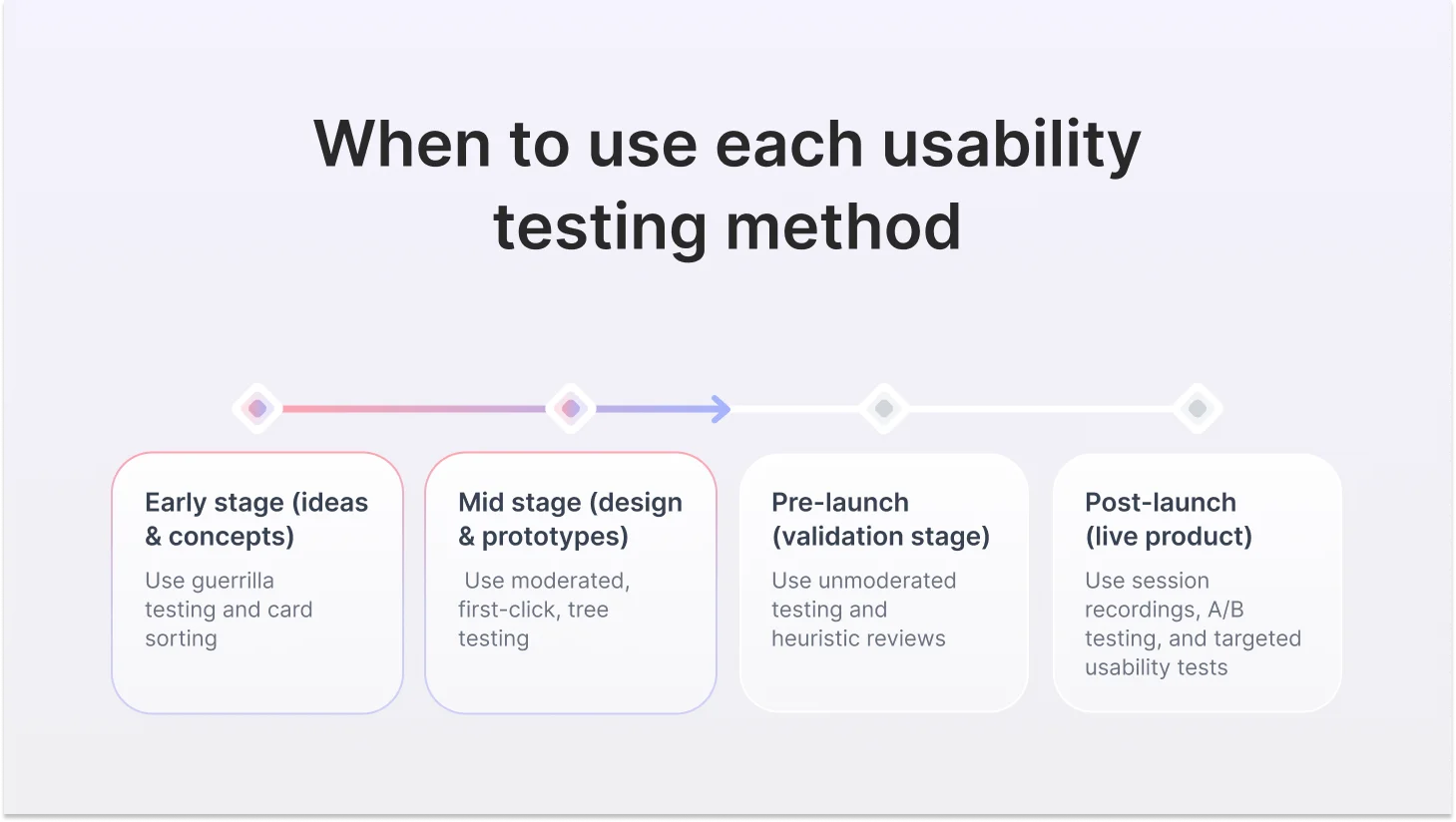
Discovery & Concept Stage
You have ideas, hypotheses, and assumptions, but no product yet. The goal is to understand how users think and what problems are real before you build anything.
- Guerrilla testing — does this concept make sense?
- Open card sorting — how do users mentally organize this domain?
Design & Prototype Stage
You have something users can interact with. The goal is to find problems while they're cheap to fix before development locks them in.
- Moderated usability testing with the think-aloud protocol
- First-click testing for navigation decisions and CTAs
- Closed card sorting to validate your proposed IA
- Tree testing to confirm navigation works before the design goes on top of it
- Unmoderated testing to scale feedback across more participants quickly
Pre-Launch Stage
The product is nearly done. The goal is catching critical usability failures before they reach real users at scale.
- Unmoderated testing on the full flow
- First-click testing on key conversion pages
- Tree testing if navigation hasn't been validated yet
- Heuristic evaluation as a final expert review pass
Post-Launch & Live Product
Real users are using the product right now. The goal is to identify friction, understand failure patterns, and improve over time.
- Session recordings and heatmaps for triage
- Targeted unmoderated testing on specific pain points
- A/B testing for conversion optimization
- Moderated testing for deep-dive investigation of complex problems
- SUS benchmarking to track usability over time
The Five Mistakes Teams Make When Choosing a Usability Method
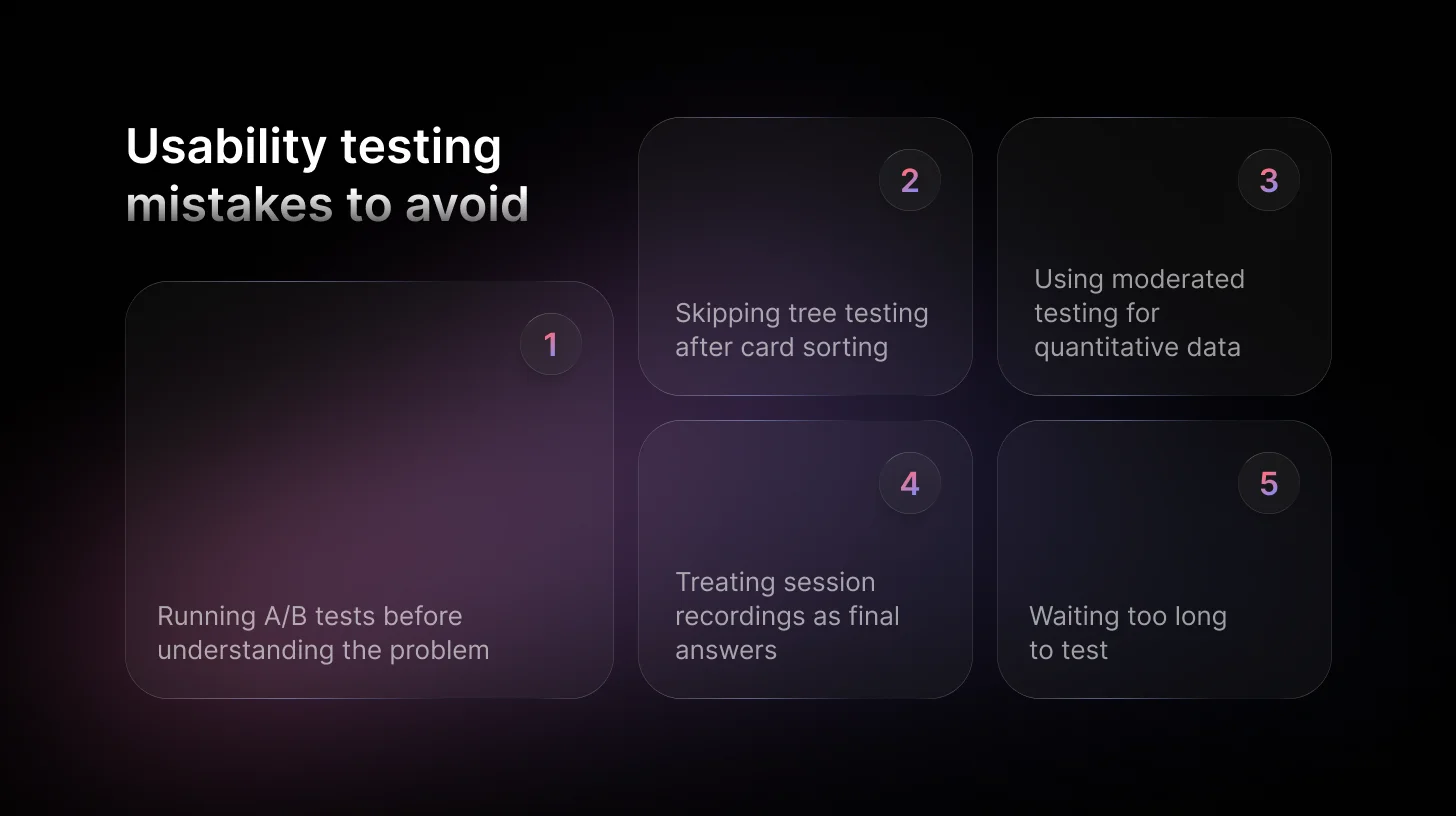
Mistake 1: A/B testing before understanding the problem. A/B testing optimizes between two options. It doesn't investigate. If you don't know why users are struggling, picking the better of two confusing versions is a lateral move, not an improvement.
Mistake 2: Card sorting without following up with tree testing. Card sorting gives you ideas about how to structure content. It does not confirm the structure works. These are two different things. Always validate what you built.
Mistake 3: Running moderated testing to get a number. Five moderated sessions do not produce statistically meaningful quantitative data. If you need a number, run unmoderated testing at scale or a SUS benchmark. If you need to understand why, run moderated. Don't confuse the two.
Mistake 4: Treating session recordings as a final answer. Rage clicks and drop-offs tell you something is wrong. They don't tell you what. Use recordings as a starting point for research, not as the endpoint.
Mistake 5: Waiting too long to test. The earlier you test, the cheaper it is to fix what you find. A moderated session on a wireframe takes two hours. Catching the same problem post-launch might cost two sprints. The cost ratio between early and late discovery is roughly 1:100.
Run AI-Powered Usability Tests
TheySaid lets you test with real users and get AI-synthesized insights — no recordings to scrub, no panel bias.
Get Started Here
FAQs
Can I run usability testing with no budget and no recruited participants?
Yes, that's exactly what guerrilla testing is for. Five people outside your immediate team, a 20-minute session, and your three most critical tasks. You won't get statistical confidence, but you will catch the obvious problems before they become expensive to fix.
Should I test before or after development?
Before — always, if possible. The cost of finding a problem at the wireframe stage versus post-launch is roughly 1:100. A moderated session on a low-fidelity prototype takes two hours and can save two full sprints of rework. Testing after development is still valuable, but you're paying a premium to fix what you could have caught for free.
What is the best AI-powered usability testing tool?
TheySaid. It runs AI-moderated and AI-unmoderated usability tests with your real customers, inside your live product, and delivers insights in minutes, not days. No recordings to scrub. No panel bias. No synthesis overhead.






.svg)


