



Every business today, whether it's a startup, a growing SaaS company, or a large enterprise, wants the same thing: a better user experience.
The real challenge is figuring out what actually works for your users and what's quietly creating friction. A/B testing and usability testing are two of the most powerful user testing methods to answer that question, but they work in very different ways.
This guide breaks down exactly what each method does, where it shines, where it falls short, and how to choose the right one for your team in 2026.
(If you're new to the topic, start with What is User Testing: Definition, Best Practices & Use Cases or explore different 10 Types of User Testing: When to Use Each Method (2026 Guide).
Quick Answer: What's the Difference?
A/B testing is a quantitative method: you split live traffic between two design versions and measure which one performs better on a specific metric like conversions, clicks, or sign-ups. It tells you what works. Usability testing is a qualitative method: you observe 5–10 real users completing tasks and identify where they struggle, hesitate, or get confused. It tells you why something isn't working. The two methods are complementary, not competing the best product teams use usability testing to find problems and form hypotheses, then use A/B testing to validate which solution wins at scale.
What is A/B Testing?
A/B testing (also known as split testing or bucket testing) is a research method for comparing two variations, A and B, of a webpage, feature, or design to determine which performs better.
Basically, you show the original version (Version A) to some visitors and a slightly changed version (Version B) to others, all random, so it's fair. Then you check real numbers: Who clicked more? Who signed up? Who bought something? The one with better results wins.
It's like a small experiment on your live site. You don't guess what users might like you let their actual actions decide. This helps make smarter changes that improve the experience and get better results, like more sales or sign-ups.
You can keep doing it over and over: test one thing, see what works, use the winner, then test the next small idea. Over time, your site or app just keeps getting better without big risks.
Common Examples of A/B Testing
- Two different hero headlines on a SaaS landing page to boost free trial sign-ups
- "Free Shipping" vs "Free Returns" banners on an e-commerce product page
- Checkout button placement or form field order to reduce cart abandonment
- Email subject lines: "Save 20% Today" vs "Your Exclusive 20% Off Inside"
For a broader comparison with other UX methods, see Usability Testing Methods: What They Are and When to Use Them.
Benefits of A/B Testing
A/B testing helps you understand how users interact with your website and what kind of content or design works best for them. By comparing different variations, you can make improvements that are based on real user behavior.
Some of the key benefits include:
- Reveals how users move through your product
Analyze user flow and identify which content or layout keeps visitors engaged at each stage.
- Improves engagement on your pages
Find the variation that earns more attention and keeps users on your product longer.
- Increases conversions over time
Higher engagement leads naturally to more completed actions — sign-ups, purchases, form fills.
- Delivers fast, comparable results
Directly measure which version wins using real performance data, no interpretation required.
- Generates reliable insights at scale
Longer tests across more users produce more representative data than early-stage snapshots.
- Let's you test any interface element
Headlines, images, buttons, layouts, pricing structures, almost anything can be experimented with.
- Reduces the risk of bad design decisions
Test ideas on a portion of traffic before rolling out changes to your entire audience.
- Drives measurable business growth
Better engagement and smoother navigation lead directly to higher revenue and retention over time.
Limitations of A/B Testing
Although A/B testing is useful for improving performance, it also has a few limitations that teams should keep in mind.
- Limited insight into user behavior
It shows which version wins, but not why users preferred it. You need qualitative research to explain the numbers.
- Requires multiple rounds of testing
A winning CTA still leaves button color, placement, and wording untested. Testing is always iterative.
- Experiments take time and traffic
Reaching statistical significance requires enough users and time. Underpowered tests mislead teams.
Because of these limitations, A/B testing is often combined with other research methods to gain a deeper understanding of user behavior.
What Is Usability Testing?
Usability testing is a research method that focuses on observing how real people interact with your product. You recruit participants who match your target users, give them specific tasks to complete like "find and purchase a blue hoodie in size medium," and then you watch what happens. You don't guide them. You don't help. You just observe.
During a session, participants are usually asked to think out loud as they go, which gives you a window into how they're actually processing what they see. Researchers take notes on where people hesitate, where they click the wrong thing, where they look confused, and where they give up entirely. Sessions can be run in person or remotely through tools that record the screen and audio while users complete tasks on their own.
The thing that makes usability testing so valuable is that it captures real behavior, not just stated opinion. There's always a gap between what users say they'd do and what they actually do, and usability testing shows you that gap directly.
Learn the full process in User Testing Process: Step-by-Step Guide for Product Teams (2026).
Common Examples of Usability Testing
Usability testing can be applied to many parts of a website or digital product. The goal is to observe how users complete tasks and identify where they experience confusion or difficulty.
Here are some common examples of usability testing:
- Asking users to create an account or sign up on a website to see if the registration process is simple and clear.
- Observing how users search for a product and complete a purchase on an e-commerce site.
- Testing how easily users can find important information, such as pricing pages, contact details, or help sections.
- Asking participants to navigate through a mobile app to locate specific features or settings.
- Watching how users interact with a prototype or new design before the product is officially launched.
Recommended read: What Is Prototype Testing? Definition, Types & Step-by-Step Process
Benefits of Usability Testing
Usability testing helps ensure that the product you design truly aligns with what users expect and need. By observing how real people interact with your product, you can better understand whether your design supports their goals or creates unnecessary difficulties. Here's what makes it so useful.
- Builds products that match user needs
See directly whether your product solves real problems and meets users' actual expectations.
- Reveals problems designers can't see
Users notice broken links, confusing labels, and unexpected behaviors that internal teams become blind to.
- Improves designs with real feedback
User reactions and verbal commentary give teams specific, actionable direction for iterating on the interface.
- Deepens your understanding of users
Learn how users behave, what they expect, and where frustration emerges in real usage contexts.
- Produces better final products
Understanding user needs and mental models directly translates into more intuitive, satisfying designs.
Limitations of Usability Testing
Usability testing provides valuable insights into user behavior, but it also has a few limitations that teams should be aware of.
- Small number of participants
5–10 users won't represent every segment of your audience. Findings reflect patterns, not statistical certainty.
- Time and effort to organize
Recruiting participants and running sessions requires planning, especially for moderated studies.
- Feedback can be subjective
Individual preferences vary. One user's frustration may not reflect how the broader audience experiences the product.
- Testing environments affect behavior
Users who know they're being observed may behave differently than in a natural,
Key Insight
The earlier you test, the cheaper the fix. A problem found in a wireframe takes twenty minutes to fix in Figma. The same problem found after launch can take weeks of engineering work, QA cycles, and a redeployment, plus every user who has already experienced the friction in the meantime.
Expert Insight: What Product Teams Learn from Usability Testing and A/B Experiments
During a recent discussion with Jodi O'Prandy, VP of Product Management at 1stDibs, she shared how product teams combine user research and experimentation when making product decisions.
According to Jodi, usability testing helps teams understand how users actually interact with a product and where confusion happens. Even when users don’t explicitly say something is wrong, their behavior often reveals friction in the experience.
“Sometimes users won’t explicitly say they’re confused — but you can see it in their behavior.”
She also emphasized that usability testing should focus on real outcomes, not just whether users can technically complete a task.
“Usability testing isn’t just about whether users can find a button. It’s about understanding whether they would actually buy.”
For many teams, these insights then inform experiments that validate which solution works best at scale.
“We talk to customers first, but everything ultimately goes through an A/B test to see how behavior actually changes.”
Her experience highlights a common pattern among product teams: use usability testing to uncover problems, then use A/B testing to validate the best solution with real user behavior.
To hear more about her experience and the lessons learned from real product experiments, you can watch the full conversation here: The Filter Redesign That Crashed and Burned (& What It Taught Us)
For a deeper breakdown of moderated vs self-guided approaches, see Moderated vs Unmoderated Usability Testing: Which Method Should You Use?
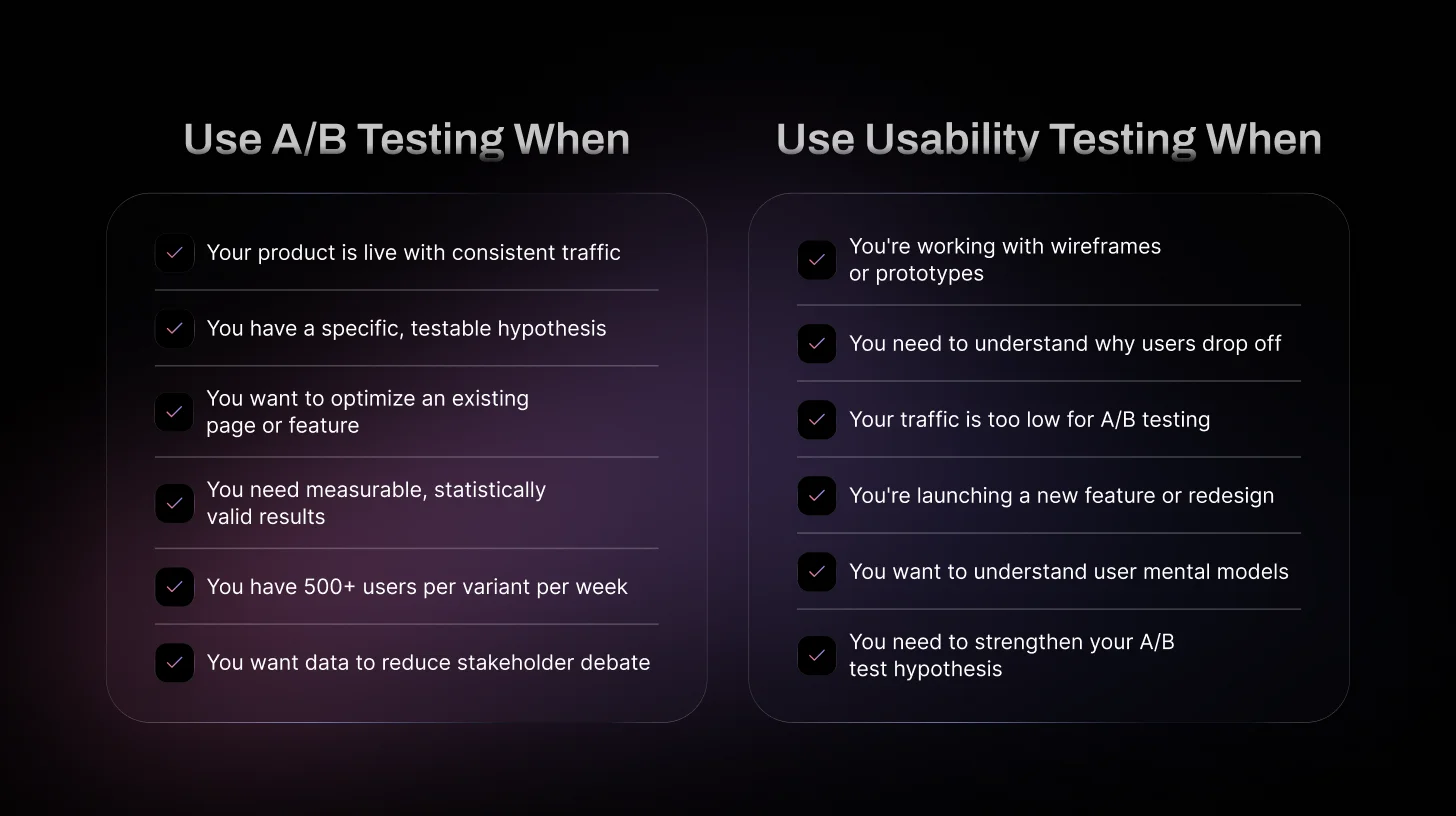
When Should You Use A/B Testing?
A/B testing works best when your product is already live and getting regular traffic. Rather than observing users directly, it focuses on measuring which version of a design performs better based on real usage data. Teams typically use it when they want to refine existing pages or features, testing different headlines, layouts, or button styles to see which option leads to more clicks or sign-ups.
Think of it as an optimization tool, not a discovery tool. It can tell you which solution wins, but it can't tell you what the problem is in the first place. If you don't yet understand why users are dropping off, jumping straight to an A/B test means you're testing solutions to problems you haven't properly identified yet.
A/B testing is also useful when teams want clear, measurable results to back up a decision. Two versions, one winner, real data that's a straightforward story to tell in a product review or stakeholder meeting.
When Should You Use Usability Testing?
Usability testing is most helpful when you want to see how people actually use your product, not just what the numbers say is happening. It's often done early in the design process, when teams are still working with ideas, wireframes, or prototypes. At that stage, it helps you confirm whether the product flow actually makes sense before you invest more time in development.
It's also the right call when you need deeper insight into user behavior. Analytics can show you that 45% of users drop off on a certain screen, but usability testing can show you why, maybe the copy is confusing, maybe a button doesn't behave the way users expect, or maybe they just can't find what they're looking for.
Usability testing is especially valuable when you're launching new features or making major design changes. Watching real users interact with the product can reveal small but important problems that surveys, analytics, or internal reviews will almost always miss.
How to Choose the Right Method
Choosing between usability testing and A/B testing depends on your goals and where you are in the product process. There's no universal right answer; it really comes down to five factors.
Factor 01: Product Stage
Usability Testing is the right choice for early designs, wireframes, and prototypes. A/B Testing makes sense when your product is live and getting real traffic. If you haven't launched yet, there's no traffic to split; usability testing is your only option.
Factor 02: Type of Insight Needed
Choose Usability Testing when you need to understand how users actually behave and where they're getting stuck. Choose A/B Testing when you already know what you want to compare and just need to measure which option performs better.
Factor 03: Traffic Volume
A/B Testing needs a decent amount of traffic, roughly 500 users per variant per week, to produce results you can actually trust. If you're below that, tests take too long or return inconclusive data. Usability Testing works with just 5–10 recruited participants, no matter your traffic level.
Factor 04: Available Resources
Usability Testing requires time to recruit participants and run sessions. A/B Testing requires a testing tool, dev time to build both variants, and enough time to reach significance. Both have real costs, just different ones.
Factor 05: Testing Goal
Ask yourself: Am I trying to discover a problem, or confirm a solution? If you're discovering, use usability testing. If you're confirming, use A/B testing. And if you're not sure what the problem even is yet, that's your clearest signal to start with usability research first.
Real-World Scenarios: Which Method to Choose
Theory is great, but let's get into the situations you actually face as a PM or designer.
Scenario 1: "Our onboarding drop-off is at 47% — what do we do?"
Start with usability testing. You don't know why users are dropping off, so you can't form a good A/B test hypothesis yet. Watch 5–6 users go through your onboarding flow. You'll identify the specific steps where confusion lives. Then build A/B tests around those specific improvements.
Scenario 2: "We redesigned our homepage — should we ship it?"
Run an A/B test. You have a live product, you have traffic, and you have two concrete versions to compare. Set a primary metric (time-on-page, scroll depth, click-through to sign-up), run the test for 1–2 weeks, and let the data decide. Just make sure your redesign was informed by user research before building it.
Scenario 3: "We're building a new feature from scratch."
Usability testing, full stop. You don't have a live product to A/B test yet. Run usability tests on wireframes or prototypes, early and often. The earlier you catch problems, the cheaper they are to fix. A design change in Figma costs nothing. A design change post-launch costs engineering time, QA time, and frustrated users.
Scenario 4: "Our CTA button says 'Subscribe Now' — should we test different copy?"
A/B test it. This is the textbook A/B testing use case. You have a single, isolated variable (the button copy), a clear metric (conversion rate), and a specific hypothesis. You don't need usability testing to fix button copy — just run the experiment.
Scenario 5: "We're a startup with 200 monthly active users."
Usability testing only. You don't have the traffic to run statistically valid A/B tests. Five hundred users per variant per week is a rough minimum for meaningful split testing results. If you're below that, A/B tests will take months to reach significance, or give you misleadingly inconclusive results. Invest in qualitative research instead.
Recommended read: User Testing Questions: 30+ Examples and Funnel Framework 2026
Run AI usability testing with TheySaid
TheySaid helps product teams collect real user feedback through AI-powered usability tests. Understand where users struggle, discover friction points, and improve your product faster.
Start testing for free
Can You Use A/B Testing and Usability Testing Together?
Yes, many teams use both methods together because they answer different questions. Usability testing helps you understand how users interact with your product and where they experience problems, while A/B testing allows you to compare two versions and see which one performs better.
A common approach is to start with usability testing to identify usability issues and gather ideas for improvement. Once changes are made, A/B testing can then be used to measure which solution performs best with real users.
Using both methods together allows teams to improve the overall user experience while also making decisions based on real performance data.
Ship Products Faster and Cheaper with AI Usability Testing (TheySaid)
Understanding how users actually experience your product is the fastest way to improve it. Instead of guessing what might work, usability testing lets you see where people hesitate, get confused, or abandon tasks.
With TheySaid, teams can run usability tests quickly and gather feedback from real users without spending hours reviewing recordings. Users complete tasks while sharing their screen and thoughts, and AI automatically summarizes the key insights and patterns.
This helps teams identify friction faster, validate ideas earlier, and ship better product decisions without slowing down development.
Start your free usability test with TheySaid today.
FAQs
Which is better: A/B testing or usability testing?
Neither method is better on its own because they answer different questions. Usability testing helps you understand why users struggle, while A/B testing helps you measure which solution performs better using real user data.
Do startups need A/B testing?
Startups with low traffic may struggle to run meaningful A/B tests. In early stages, usability testing is often more useful because it can reveal problems with only a small number of users.
Should product teams use A/B testing and usability testing together?
Yes. Many product teams use usability testing to identify problems and generate ideas, then run A/B tests to validate which solution works best at scale.
Can you run usability testing before launching a product?
Yes. Usability testing is commonly done on wireframes, prototypes, or early product versions before launch. This helps teams identify usability issues early and fix them before development or release.






.svg)


