



A SaaS company spent millions building what it believed was a “killer” feature, the one the entire roadmap depended on.
Internal reviews were positive. Development moved fast. Expectations were high.
But after launch, reality hit.
Users found the feature confusing. Engagement dropped. Support tickets increased. Within months, it was quietly scaled back after burning through time, budget, and credibility.
This story is common. And preventable.
The problem wasn’t execution. It was validation.
Prototype testing uncovers usability issues, broken flows, and unclear messaging before development begins, when fixes are fast and far less expensive.
In this guide, you’ll learn what prototype testing is, why it matters, the different types of prototypes, when to test them, and a practical step-by-step framework to validate your design with confidence.
Let’s validate before we build.
If you're new to UX research, start with What is User Testing: Definition, Best Practices & Use Cases or explore different 10 Types of User Testing: When to Use Each Method 2026 Guide
Test before you build
Run AI-moderated prototype tests with real users fast. Uncover friction, validate risky assumptions, and get video-backed insights your team can act on instantly.
Get Started Here
What is a prototype?
A prototype is an early, tangible version or simulation of a product (like an app, website, or feature) that teams create to test ideas, gather feedback, and refine designs before investing in full development.
In UX/product design, it's not just a static sketch or wireframe; it's interactive enough to let real users "experience" the concept. Think of it as a rehearsal: you build a simplified model so you can see how it feels in users' hands, spot problems early, and make sure you're building the right thing.
What is prototype testing?
Prototype testing (also called prototype usability testing) is the process of sharing that early prototype with real users to gather honest feedback, spot usability issues, validate design choices, and refine the concept, all before heavy development starts.
In simple words:
Instead of building the real thing first and hoping users like it, you create a "mock-up" or clickable model (low-fidelity like sketches/wireframes, or high-fidelity like interactive Figma designs), give it to people, watch how they use it, ask what they think, and fix problems early when changes are cheap and fast.
Core Purpose of Prototype Testing
- Catch confusion, friction, or broken flows early
- Confirm if users understand the layout, navigation, and features
- Validate if the design solves the intended user problem
- Reduce risk because changes in the prototype stage cost 10–100× less than post-launch fixes
- Build confidence before development begins

“You don’t need to build and release to get data. Prototype it, put it in front of users today, and see what breaks.”
%20Knight.jpg)
Why Prototype Testing Matters More Than Ever in 2026
In 2026, AI speeds up everything from ideation to launch. Prototype testing becomes essential to guide that speed toward real success.
AI creates the "prototype economy": Tools build, iterate, and simulate prototypes in hours instead of weeks or months. Rapid validation keeps pace without chaos. Early testing stops flawed AI-powered features from growing out of control.
Faster cycles raise risks: Hyper-sprints multiply assumptions quickly. Untested prototypes trigger expensive rework, delayed launches, or outright failure under pressure for quick returns. Late discoveries hurt far more when timelines shrink.
AI supercharges testing itself: Modern user testing platforms such as TheySaid auto-summarize sessions, detect friction patterns, predict issues, and cut analysis time. They scale unmoderated tests globally and simulate scenarios, making high-quality feedback accessible to every team.
Stronger outcomes at lower cost: Early prototype testing uncovers 70–90% of issues (often ~85% with just 5 users), slashes rework by 30–50% or more, boosts conversions/retention, and ensures AI-enhanced products feel intuitive rather than frustrating.
Teams that test early & often, especially gain a massive edge: faster iteration, reduced waste, and products users truly love.
“As teams build faster, they need feedback faster. Otherwise, velocity becomes risk.”

Recommended read: How AI is changing research in AI in User Testing: Every Question PMs and UX Researchers Actually Ask — Answered)
What are the types of prototypes, and how to choose the right one?
Prototypes power the core of product discovery, helping teams test assumptions fast and cheaply before full build. Here are the primary prototype types teams use to validate ideas effectively.
Low-Fidelity Prototypes (Lo-Fi)
These are the roughest and fastest hand-drawn sketches on paper, basic wireframes scratched in Balsamiq, or simple digital outlines with almost no styling. Zero or minimal interactivity; the focus stays purely on structure, layout, navigation flow, and core concepts, with no visual polish to distract.
Best for:
- Early brainstorming and wild idea exploration
- Validating if the big-picture direction even makes sense
- Getting quick, unbiased user reactions
- Testing layout and flow without people fixating on colors or fonts
Mid-Fidelity Prototypes (Mid-Fi)
The workhorse for most testing. These add basic clickability navigation between screens, simple task flows, and lightweight interactions while keeping visuals grayscale or minimal. Tools like Figma, Sketch, or Adobe XD make it fast to build and share remotely.
Best for:
- Testing user journeys, navigation, and task completion
- Checking information hierarchy and content structure
- Gathering focused usability feedback
- Rapid iteration once early concepts feel solid
High-Fidelity Prototypes (Hi-Fi)
These feel almost like the shipped product, pixel-perfect visuals, smooth animations, micro-interactions, responsive states, loading indicators, and near-final aesthetics. Often built with the actual design system in Figma, Framer, ProtoPie, or even coded prototypes.
Best for:
- Testing visual polish, emotional response, and brand feel
- Validating animations, transitions, hover effects, and subtle behaviors
- Running deep usability tests on near-final experiences
- Stakeholder demos, buy-in, and developer handoff
Other Practical Classifications
Physical vs. Digital Prototypes
Physical (paper sketches, printed mockups, foam models) shine for hardware/tangible products or in-person workshops; they feel hands-on and spark creative discussion.
Digital prototypes rule in 2026 for web, mobile, and SaaS. They’re remote-friendly, clickable, version-controlled, and pair perfectly with AI testing tools for fast unmoderated feedback.
Proof-of-Concept (Feasibility) Prototypes
Engineer-focused builds that answer “does this core mechanic or integration actually work?” Narrow scope, often coded quickly to prove technical viability. Mostly internal; they guide what deserves full UX prototyping and prevent chasing impossible ideas.
Live-Data or Functional Prototypes
Connected to real APIs, databases, or user inputs for authentic, dynamic behavior, personalized feeds, live search, and real-time updates. They test realism in production-like scenarios but need dev support, so they’re reserved for late validation when fake data won’t cut it anymore.
Tip:
Match the type to your stage: lo-fi for fast discovery, mid-fi for heavy iteration, hi-fi for polish and sign-off, feasibility for tech risks, live-data for final realism checks. Keep the progression tight, feedback sharp, and wasted effort minimal.
When to do Prototype testing?
Prototype testing should happen whenever a meaningful design decision is being made, not just before launch. The earlier you test, the cheaper and easier it is to fix issues.
Here are the key moments to test:
When you have a low- or mid-fidelity prototype: As soon as your idea has structure, test the core flow, layout, and navigation direction.
After building a high-fidelity prototype, validate task completion, clarity, micro-interactions, and overall usability before development handoff.
Before committing engineering resources: Ensure users can complete primary actions and understand the experience before investing in build time.
When launching or iterating on a feature: Test placement, discoverability, and usability before rolling changes out live.
When metrics show friction: If you see drop-offs, confusion, or low engagement, prototype improvements and test before implementing fixes.
Also read: Remote Usability Testing: Definition, Types, Methods, and Best Practices for faster feedback loops.
Test before you build
Run AI-moderated prototype tests with real users fast. Uncover friction, validate risky assumptions, and get video-backed insights your team can act on instantly.
Get Started Free
What are the Benefits of Prototype Testing?
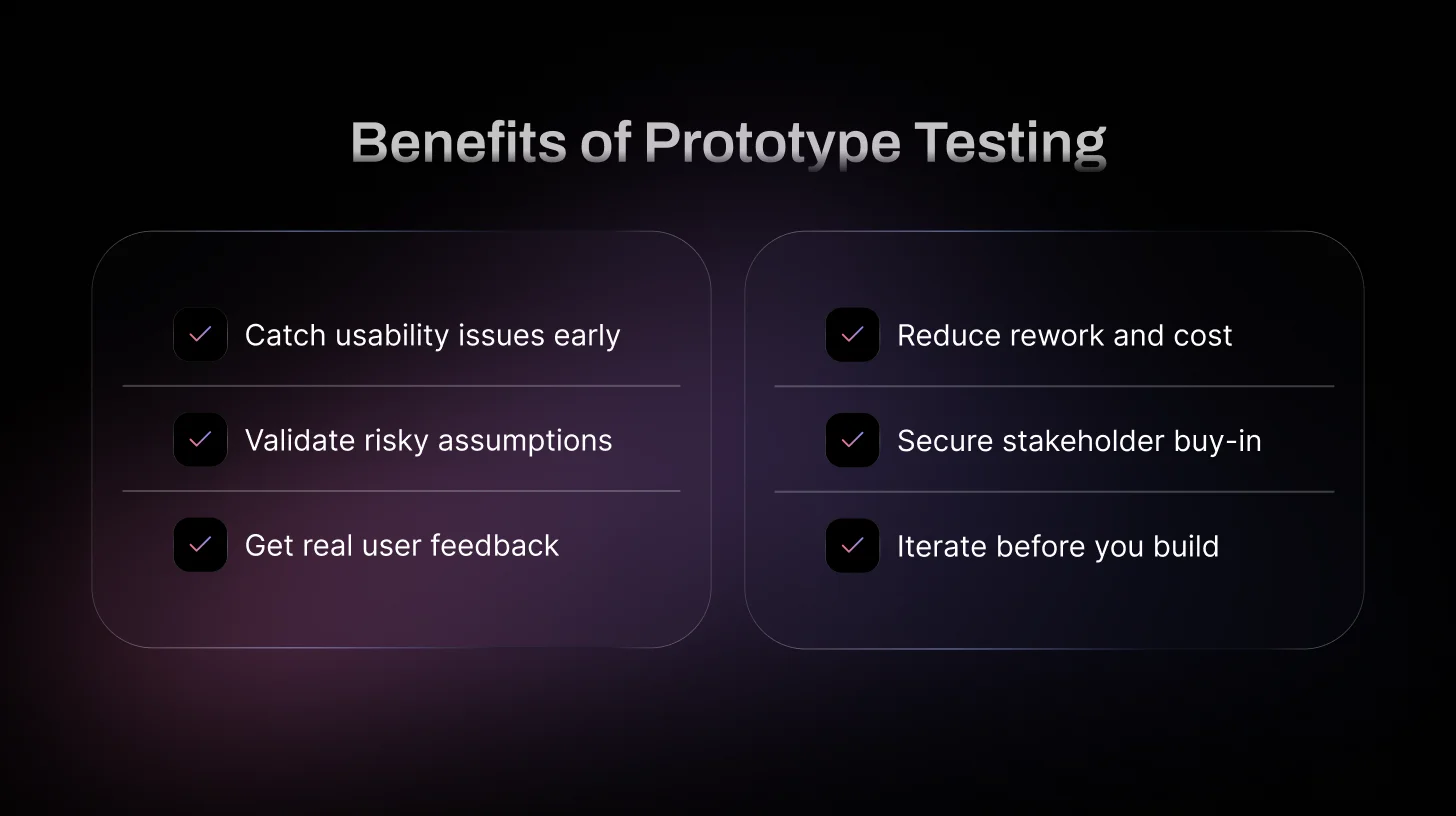
Prototype testing is one of the smartest moves you can make in product design—it lets you iterate fast, build what users actually want, and avoid expensive mistakes. Here are the top reasons why teams in 2026 swear by it:
Spot and fix design problems early
Catch usability killers like hidden buttons, confusing flows, or unclear copy before they go live. Fixing a layout issue in a prototype takes minutes; fixing it after launch can tank conversion rates and cost weeks of dev time.
Validate your assumptions and hypotheses
Test ideas head-on: Does moving the CTA right improve findability? Do users understand your microcopy? Run quick A/B or task-based tests on prototypes to prove (or debunk) what you think works. This turns gut feelings into data-driven decisions and keeps your team focused.
These hypotheses can later be validated at scale using A/B testing — see A/B Testing vs Usability Testing: Key Differences and When to Use Each.
Gather real user feedback before it’s too late
Get honest reactions from actual people early, so you can empathize with their struggles and kill false assumptions. What feels obvious to your team often confuses users. Prototype testing reveals those blind spots and prevents negative reviews or churn down the line.
Save serious time and money
Changes in the prototype phase are dirt cheap compared to post-launch fixes, bug tickets, emergency deploys, or full redesigns. A solid testing habit means less rework, fewer resources wasted, and a faster path to a polished product.
Secure stakeholder and team buy-in
Show clickable prototypes with real user data instead of slides and opinions. When execs or clients see users struggling with one version and loving another, decisions become evidence-based. It’s much easier to get approval for the user-first option when you bring proof.
Enable continuous iteration and better launches
Prototype testing isn’t a one-off; it’s a loop that runs from early sketches to near-final polish. You keep refining based on fresh insights, so the final product truly solves user needs, feels intuitive, and stands a much higher chance of success at launch.
What are the methods of Prototyping testing?
Moderated vs. Unmoderated – The Main Choice
Moderated testing is like having a conversation: You're there live, watching every click, hearing every "hmm," and jumping in with follow-ups like "What made you hesitate there?" or "Walk me through your thinking." It's gold for complex prototypes where you need to understand motivations and edge cases. Drawback? It takes more time to schedule and run.
Unmoderated flips it: Share a link (Figma prototype, staging URL), users complete tasks whenever, and tools capture everything: screen, voice, clicks. Platforms auto-highlight friction points or calculate success rates. It's perfect when you want volume fast (e.g., test two checkout variants with 30 people in a day) or when budget/time is tight. Behavior feels more natural without someone watching.
Remote vs. In-Person
Remote dominates in 2026, most US teams run everything online because it's convenient, reaches diverse participants (urban SF users to Midwest small-business owners), and uses real devices/environments. No flights, no labs.
In-person is rarer now, but useful for niche stuff like testing AR features, hardware integrations, or when you really need to see facial expressions up close without video lag.
Think-Aloud Protocol
Super common add-on: Ask users to narrate their thoughts out loud ("I'm clicking this because I expect it to take me to settings... oh, that's not it"). It reveals mental models and hidden frustrations. Works great in both moderated (prompt if they go quiet) and unmoderated sessions.
Task-Based Testing
The go-to format: Give realistic scenarios like "You're signing up for a new project management tool, create a board, invite a teammate, and assign a task." Watch where they succeed, get stuck, or rage-quit. Focuses on goals over features, so you validate if the design actually helps users win.
Pro tip:
Keep tasks goal-oriented and story-like ("Recover a lost password after forgetting it on your phone") instead of step-by-step instructions. That way, you test real intuition.
Top 5 Prototype Testing Tools in 2026
1. TheySaid — Best AI-Powered Prototype Testing Platform
TheySaid combines real user testing with AI-moderated analysis, helping teams uncover usability issues faster without manually reviewing hours of recordings.
Pros:
- AI-generated follow-up questions during tests
- Automatic insight summaries and pattern detection
- Real user screen plus voice feedback
- Fast setup for clickable prototypes
- Built for rapid iteration cycles
Cons:
- Best suited for digital products (web/SaaS/mobile)
Why it stands out: TheySaid reduces analysis time dramatically while preserving real human insight, making it the strongest choice for modern product teams.
2. Maze — Strong for Rapid, Remote Testing
Maze allows teams to test Figma prototypes quickly with unmoderated usability studies.
Pros:
- Easy Figma integration
- Quantitative metrics (success rate, misclicks, time on task)
- Simple setup for fast testing
Cons:
- Limited depth compared to moderated tools
- Less conversational insight
3. UserTesting — Enterprise-Grade Research
Usertesting is a robust platform for moderated and unmoderated usability testing with a large participant pool.
Pros:
- Large user panel access
- Strong qualitative research capabilities
- Enterprise-level reporting
Cons:
- Expensive
- Slower setup for small teams
4. UXPin — Advanced Interactive Prototyping
UXPin blends prototyping and testing for complex interaction design.
Pros:
- Advanced interactions and logic
- High-fidelity prototyping capabilities
- Good for design systems
Cons:
- Steeper learning curve
- Primarily a design tool, not a dedicated testing platform
5. Lyssna — Lightweight & Budget-Friendly
Lyssna is great for quick preference tests and early-stage validation.
Pros:
- Affordable
- Fast unmoderated tests
- Useful for first-click and preference testing
Cons:
- Limited deep usability sessions
- Less suitable for complex flows
Prototype testing vs usability testing
These two terms are often used interchangeably in UX conversations, but they’re not the same thing. Understanding the distinction helps teams choose the right approach at the right time and avoid wasting effort on the wrong kind of feedback.
Explore a full comparison of platforms in 10 Best AI User Testing Tools in 2026: Features & AI Capabilities Compared.
How to Do Prototype Testing Using the V.A.L.I.D.A.T.E Framework in 2026
The V.A.L.I.D.A.T.E framework is a personal checklist I created to make prototype testing more focused and repeatable.
It combines risk-first thinking, behavior observation, rapid iteration, and evidence-based handoff into eight clear steps.
I use it every time I need to validate a design quickly and confidently — here’s the full breakdown.
V – Verify the Risk
Every effective test begins by identifying the single biggest assumption or uncertainty that could kill the feature. Without this step, you end up with generic praise (“looks good”) that doesn’t move the roadmap forward.
In 2026, sprint time is limited, so limit yourself to 1–3 high-impact risks.
Examples:
- SaaS tool onboarding: “Will users grasp the core value proposition within the first 45–60 seconds after signup?”
- E-commerce checkout: “Will users trust entering card details on this mobile checkout screen?”
- Food delivery app: “Will users abandon cart when they see dynamic delivery fees or surge pricing during peak hours?”
Convert risks into sharp, falsifiable questions:
- “What do you think happens next after this screen?”
- “How confident do you feel entering your payment info here—and why?”
- “If this were live right now, would you finish the order?”
Document these hypotheses in Notion, FigJam, or your team wiki before you recruit anyone.
A – Align Prototype Fidelity
Choose the right level of realism for the specific risk. Too much polish wastes time; too little hides critical issues like trust or visual hierarchy problems.
Mid-fidelity (clickable grayscale wireframes in Figma): ideal for navigation, task flow, information architecture, or basic usability risks.
High-fidelity (Framer, ProtoPie, or advanced Figma with animations, real content, loading/error states): required for emotional response, trust signals, micro-interactions, or checkout/payment confidence.
Practical example: On a subscription pricing page, mid-fi is sufficient to test whether users understand plan differences. High-fi is essential to validate if subtle animations, trust badges (e.g., “Secure Checkout”), and card form styling make users comfortable proceeding.
L – Launch Real-World Scenarios
Feature commands produce robotic behavior. Goal-based scenarios with context, motivation, and constraints generate authentic user actions and expose genuine friction.
Weak task: “Apply a promo code.”
Strong scenario: “It’s Friday night in Austin. You’re ordering takeout for game night with friends. Budget is $50 max, you want delivery in under 40 minutes, and prefer Apple Pay if available, go ahead and place the order.”
This uncovers surprises like unclear fee breakdowns, missing group-order features, or location detection issues. Always prompt think-aloud: “Tell me everything you’re thinking and doing as you go.”
I – Investigate Behavior First
What users do is far more truthful than what they say. In moderated sessions, observe quietly at first: track cursor movement, long pauses, back-button presses, rage-clicks. In unmoderated tests, rely on think-aloud audio, screen recordings, and heatmaps.
Neutral, open-ended prompts only:
- “What’s going through your mind right now?”
- “What did you expect to happen next?”
- “Why did you choose that option or go back?”
Common pitfall: jumping in to explain or rescue the user too soon. Let them struggle, that’s where the real usability gold lives.
D – Detect Friction Patterns
Single-user comments are noise. Repeated issues across participants are a signal.
Look for consistency:
- Six out of eight users miss the filters; it’s an information architecture flaw.
- Multiple users assume the brand logo returns to the home; it’s a mental model mismatch.
- Consistent drop-off at payment,s trust, clarity, or flow issue.
In 2026, leverage TheySaid to automatically tag confusion points, sentiment, drop-offs, and pattern clusters. Then manually review recordings to confirm. Ask:
- “Where do most hesitations or loops happen?”
- “What incorrect assumptions keep appearing?”
- “Which drop-off points recur across sessions?”
A – Adjust Rapidly
The core advantage of prototype testing is near-zero-cost changes. Fix one element, retest immediately.
Examples of fast adjustments:
Change vague label “Proceed” to “Confirm Order & Pay Now.”
Reposition a buried CTA higher on the screen and add contrast or subtle hover animation.
Add a progress bar or step indicators in longer flows.
Track improvement with hard metrics: target 30–50% gains in task success rate or time-on-task per iteration loop. Top teams run 2–3 rapid rounds per sprint.
T – Test Again Before Development
Never assume a fix worked; prove it. Run a targeted second round focused only on the friction you addressed.
Round 1 finding: Pricing tiers are confusing.
Round 2 questions: “In your own words, explain the difference between Basic and Pro.” “Is anything here still unclear or risky?”
Success benchmark: 85–90% unguided completion rate plus clear, confident user explanations. Only then, hand off to engineering.
E – Execute With Evidence
Close the loop with a concise, visual handoff package that the entire cross-functional team can trust.
Include Short highlight clips and Before-and-after metrics (task success %, time-on-task, heatmaps, drop-off rates)
One-sentence summary: “Core risk mitigated: 92% unguided onboarding completion, 45% faster task time.”
Prototype Testing Best Practices
Good prototype testing is not about fancy tools or large sample sizes. It is about obtaining honest, actionable feedback that actually improves your design. The practices below separate teams that consistently ship effective products from those that guess and iterate blindly.
Keep scenarios grounded and human
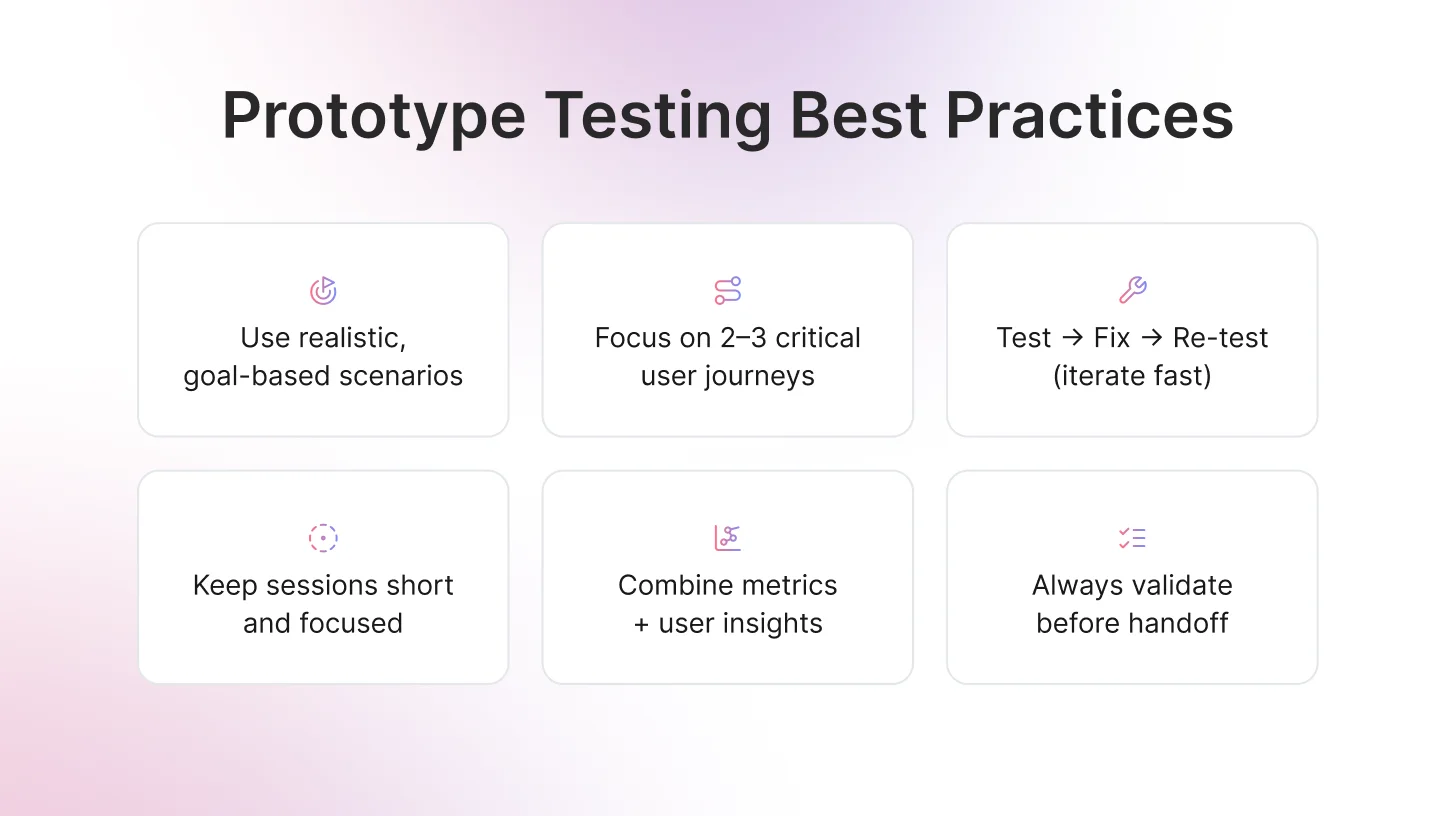
Write tasks that reflect how people truly use your product in daily life. Avoid rigid step-by-step instructions. Provide context, a clear goal, and some natural constraints. This approach surfaces real user behavior, uncovers friction points, and reveals workarounds that you might never notice otherwise. Focus on the 2–3 most critical user journeys per round rather than attempting to cover everything.
Build iteration into the process
One round of testing rarely produces perfect results. Treat testing as a continuous loop: test, make adjustments, and retest the same flow with new users. Multiple iterations confirm that changes actually work and ensure you are not introducing new issues. Teams that consistently run 2–3 rapid iterations per feature achieve stronger usability metrics and higher confidence before handoff.
Respect participants’ time and attention
Keep unmoderated sessions between 15–25 minutes and moderated sessions under 45 minutes. Users can become fatigued or distracted, which reduces the quality of insights. If you have multiple flows or variants to test, separate them across different sessions or participant groups. Fresh participants provide more accurate and meaningful feedback.
Combine quantitative and qualitative insights
Track measurable metrics and layer them with qualitative insights from think-aloud commentary to understand the reasoning behind user actions. Numbers indicate the scale of the problem, while user stories explain why it occurs. Together, they create a compelling case for design decisions and guide actionable improvements.
A few more high-leverage habits
- Start with a tight hypothesis; every time, know exactly what risk you’re validating before recruiting.
- Run an internal dry-run with 1–2 non-designers to catch dumb bugs first.
- Always re-test after big changes—don’t assume the fix landed.
- Share short clips + metrics (not just bullet points) so the whole team feels the user pain.
- Keep a lightweight running log of findings so you don’t repeat the same mistakes sprint after sprint.
Craft better tasks using User Testing Questions: 30+ Examples and Funnel Framework 2026.
The Future of Prototype Testing: AI-Powered User Testing with TheySaid
Want to take your prototype testing from “good feedback” to actionable, video-backed insights in days instead of weeks?
TheySaid is the smartest way to test prototypes in 2026.
You simply share your Figma link or live prototype, describe your product, and TheySaid’s AI builds a professional test plan, recruits real users, moderates the entire session with smart follow-up questions, and automatically delivers:
- Timestamped video clips of real moments of confusion and delight
- Clear problem themes with video proof
- Task success rates and time-on-task metrics
- Prioritized recommendations
No more watching hours of recordings.
No more guessing why users struggle.
Whether you’re validating a new onboarding flow, checkout experience, or full SaaS feature, TheySaid turns your prototype into fast, reliable evidence your whole team can trust.
Ready to test smarter?
FAQs
What Are the Two Types of Prototype Models?
The two types of prototype models are low-fidelity prototypes and high-fidelity prototypes. Low-fidelity prototypes are simple sketches or wireframes used for early idea validation, while high-fidelity prototypes are interactive, near-final designs used for detailed usability testing before development.
What is a prototype in UX design?
A prototype is an early, interactive model or simulation of a product (like an app, website, or interface) that lets teams test ideas before full development. It mimics key aspects of the final design layout, flow, and interactions—without being the real thing.
Examples: A clickable Figma wireframe showing app navigation, a paper sketch of a dashboard layout, or a high-fidelity Framer mockup with animations and real copy.
How do you test prototypes?
Follow a simple flow:
- Define a clear risk or hypothesis (e.g., "Will users find the search bar quickly?").
- Choose the right fidelity (lo-fi for concepts, hi-fi for polish).
- Write realistic, goal-based tasks (not step-by-step commands).
- Recruit 5–8 matching users.
- Run moderated or unmoderated sessions with think-aloud.
- Analyze patterns in behavior, metrics, and feedback.
- Fix and re-test the changes.
- Document evidence for handoff.






.svg)


