



Asking the right questions in the right way is the key to the success of your UX research because even great prototypes can hide massive issues behind polite feedback.
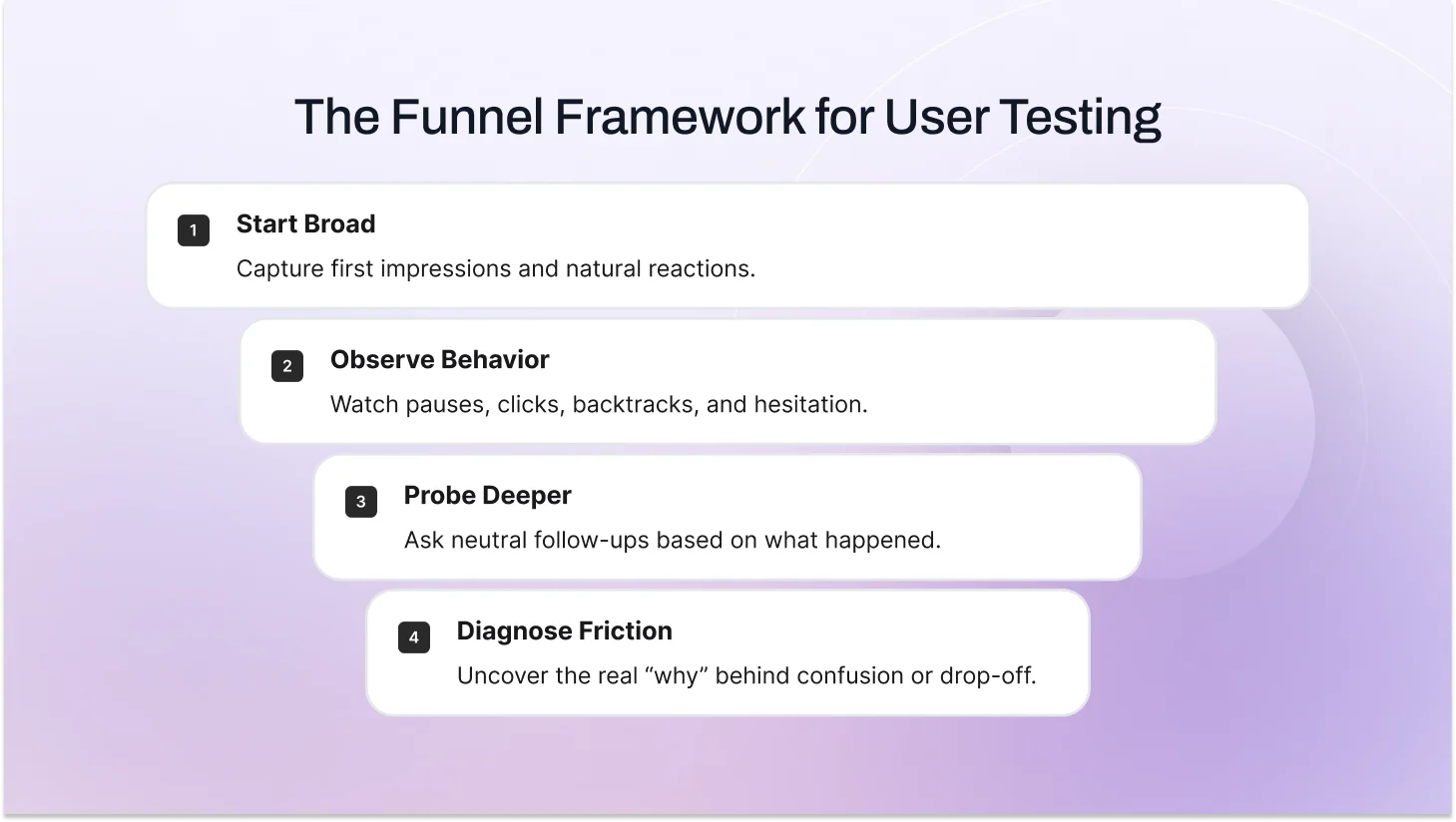
The winning pattern is funnel questioning. It starts with wide and open questions, such as: (“What would you do first here?” “Tell me about a similar tool you’ve used”), then narrows with layered, neutral follow-ups such as: (“What were you looking for?” “Why hesitate there?”).
In this blog post, you’ll learn the exact user testing questions to ask, explore our proven framework for writing better ones, and learn how to structure usability testing questions in a way that produces reliable, actionable results.
If you're new to the practice, start with our complete guide on what user testing is and why it matters.
What Is The Goal Of User Testing Questions?
User testing questions exist to help teams uncover how people actually think, behave, and make decisions when interacting with a product idea, prototype, or feature.
Instead of relying on assumptions or internal opinions, these questions make it possible to gather structured user feedback and apply it directly to product decisions.
Effective user testing questions give teams the clarity to:
- Validate product direction before development
- Identify friction early
- Reduce costly rework
- Build based on evidence rather than belief
Effective sessions also support deeper behavior analysis. By pairing structured questions with observation, teams can track usability metrics like task completion, hesitation points, and confidence levels. In a formal usability study, this kind of data feeds directly into product improvements and conversion optimization decisions.
Screener Survey Questions (Pre-Recruitment / Pre-Invite Phase)
This happens days/weeks before the live session via a short survey (5–10 questions max) to qualify and recruit the right people. Focus here on quick filters to avoid wasting time or making people uncomfortable early.
Background & Behavioral Screening Questions
These are the real filters in the screener survey. They check habits and experience, not just who someone claims to be.
Examples:
- How often do you shop online for clothing or accessories? (Daily / A few times a week / A few times a month / Rarely / Never)
- What’s the last thing you bought online in the past 3 months? (Open text)
- Have you ever abandoned an online cart before finishing? (Yes / No / Not sure)
- Which device do you use most for online shopping? (Phone / Tablet / Laptop / Desktop)
Mix in distractors (e.g., “I don’t shop online”) so no one can guess the “right” answer. If someone picks every frequent-shopper option too perfectly, follow up with: “Walk me through your last online purchase. What made you choose that site?” Real shoppers can tell the story; others stumble. This improves participant screening accuracy and protects your UX research validity.
Demographic User Testing Questions (Light Segmentation)
Demographics live in the screener survey (pre-invite), not the live call. Keep them light, optional where possible, and with ranges/distractors so people don’t feel grilled. These help with user segmentation, audience targeting, and analyzing usability trends across groups.
Examples:
- What age range are you in? (18–24 / 25–34 / 35–44 / 45–54 / 55+ / Prefer not to say)
- Which best describes your household? (Single, no kids / Married/partnered, no kids / With kids under 18 / Other)
- What’s your approximate annual household income? (Under $50k / $50k–$100k / $100k–$150k / Over $150k / Prefer not to say)
- How do you describe your gender? (Open text or options + prefer not to say)
Only ask what you really need. Too many personal questions drop completion rates fast. And always have a “prefer not to say” option. Respect goes a long way.
Not sure how to structure the full session around these questions? Here's our step-by-step user testing process guide.
Questions to Ask Before the User Test (Live Session Warm-Up)
These happen in the first 5–7 minutes of the actual session after warm-up, before any tasks or screens. They give you baseline context so you can read user behavior, decision-making patterns, and mental models correctly later.
Pre-test user testing question examples you can use:
- Walk me through the last time you bought something online, what stood out, good or bad?
- How often do you shop online for clothes or similar stuff? Daily? Weekly? A few times a month?
- Do you usually go to guest checkout or create an account? Why do you lean that way?
- On a scale of 1–10, how comfortable are you with online shopping on mobile vs desktop?
- What device do you mostly use for purchases, and why that one?
These questions surface expectation baselines and reveal behavioral context.
For example, if a participant says, “I always choose guest checkout to avoid sharing my email,” and your flow forces account creation, you now understand the hesitation clearly. It’s not confusion. It’s friction against a strong existing preference.
That context turns simple behavior into actionable insight.
Questions to Ask During the User Test
This phase captures real behavior as users complete tasks. Begin with broad questions to let natural interaction unfold, observe closely for pauses, backtracks, or unexpected choices, then ask targeted follow-ups only when something interesting happens. Stay neutral, interrupt minimally, and let actions speak first, probes come second to uncover the real “why.
First-Impression Questions (Top of the funnel: capture raw, unfiltered reactions right away)
These help you understand initial expectations before users dive in.
- What are your first thoughts when you see this screen?
- What stands out to you right away?
- Show me what you’d do first if this were your real session/cart.
Task-Based Questions (Usability Focus) (Give clear, realistic scenarios so behavior feels natural)
These set up the task without guiding the path, and let them explore on their own.
- You’ve added this item. Show me what you’d do next to complete the purchase, as if this is real. Take your time.
- Imagine this is your actual checkout. Walk me through how you’d finish it.
- If you needed to [complete goal], how would you go about it here?
The right questions also depend on which type of user test you're running. Here's a breakdown of all 10 types.
Observation-Based Follow-Ups (Middle of the funnel: tie directly to what you just saw)
Jump in only when you notice a pause, backtrack, hesitation, or unexpected click.
- You paused there — what were you expecting to see/happen?
- What’s going through your mind right now?
- Why did you choose that route/button instead of the other one?
- You went back to the previous screen — what made you do that?
Probing & Clarifying Questions (Bottom of the funnel: dig into pain points and ideal fixes)
Use these once friction is clear; they uncover the “why” and spark solution ideas.
- What part of this felt confusing, frustrating, or off?
- If this were your real purchase right now, what feels completely wrong or missing?
- What would make this step 10× easier or better for you?
- If you had a magic wand, what’s the first thing you’d change here?
Post User Test Reflection Questions
End every session with reflection to catch loose ends, get quotable gold, and capture metrics.
Standard follow-ups:
- Overall, how did this match what you expected? Why?
- What surprised you most during the process?
- If you could change one thing, what would it be and why?
- On a scale of 1–10, how confident are you that you’d complete a purchase here?
- Anything we didn’t ask about that you’d like to share?
These often give the strongest lines: “Felt sneaky, almost left because of hidden costs worry.” They also give quick scores (confidence, SUS-style) to pair with stories for stakeholders.
What if Research Participants Ask You a Question in Usability Testing?
It happens every few sessions. They’ll say, “Is this your product?” or “Am I doing this right?” or “What are you trying to find out?”
How to handle it:
- Stay neutral and redirect: “I’m just here to watch how you naturally use it—no right or wrong. Feel free to say whatever comes up.”
- If they push on the goal: “We’re exploring how people interact with this kind of flow. Your honest thoughts are exactly what help.”
- Never confirm/deny specifics about the product; it keeps bias low.
Most people relax once they hear “no right or wrong.” If someone keeps asking, gently steer back: “Let’s jump back in, show me what you’d do next.”
Writing all of this manually takes time. TheySaid can help you generate structured tasks and follow-up questions in minutes using AI. Get started for free!
Case Study: How Funnel Questions Cut Cart Abandonment 25–30%
In many e-commerce UX usability testing sessions, checkout is the moment when everything falls apart. Shoppers add items to their cart with excitement, but then something feels off, and they bounce often without saying why.
We see this all the time: the average cart abandonment rate hovers around 70% across online stores. The fix usually isn't adding more features; it's understanding the quiet frustrations that make people second-guess their purchase.
We ran a moderated remote usability test in early 2026 with a typical online shopper in her late 20s. The site was a mid-size clothing brand selling casual wear. The goal was straightforward: figure out why so many people abandon at checkout. We kept the session focused on one high-impact task: buying a simple t-shirt and completing the purchase as a guest.
We set up the test quickly by sharing the site link and a brief product description the AI built a focused plan around our task. The session ran browser-based with screen and voice recording, and the AI moderator guided her through a funnel approach: starting broad to capture natural behavior, then narrowing with follow-ups based on what she did and said aloud.
Broad Exploration Stage
We gave her this open task:
You’ve found this t-shirt you like and added it to your cart. Now show me what you’d do next to buy it, as if this is your real shopping session, take your time.
We encouraged her to think aloud: say everything you’re thinking, looking for, or confused about, even if it seems obvious. The AI moderator reinforced this as she navigated, capturing her spoken thoughts in real time.
She clicked into checkout, scanned the cart summary, tried entering a promo code, then paused at the shipping section. She said things like:
Okay, cart looks good… but where’s the shipping cost? I don’t want surprises.
This says enter the address to see shipping, but why can’t I see it before?
I hate when sites hide fees till the end.
She didn’t proceed right away. That broad start quickly showed her mental model: she expected full cost transparency early (like she gets on bigger sites), not a surprise later. Hidden or delayed shipping costs are one of the top reasons people abandon carts.
Mid-Funnel Probes
We let her keep going naturally, then asked follow-ups tied to what we observed:
You paused at the shipping section—what were you expecting to see here?
She answered: A clear, upfront shipping price or options like free over $50. I don’t want to enter my full address just to find out it’s fifteen bucks.
What’s going through your mind as you look at the entire address field?
Worried about hidden fees popping up later, like taxes or rush shipping. Makes me think twice.
Why hesitate before clicking continue?
Looking for trust badges or a secure checkout note. Feels risky entering card details without knowing the total.
These questions uncovered silent worries about cost surprises and trust without ever putting words in her mouth.
Bottom-Funnel Deep Dives
We narrowed down to the exact pain points:
What part of the checkout flow felt confusing or off so far?
No visible shipping estimate until I give my address. Feels like a trap—many sites show it earlier.
If this were your real purchase today, what feels completely wrong or missing?
A progress bar showing step one of three, or a breakdown of costs, subtotal, estimated shipping, plus tax, before address.
Describe what you’d change about this checkout right now.
Show estimated shipping on the cart page based on zip code entry—no full address needed. Add trust badges like secure SSL and a money-back guarantee near the payment button.
We finished with the magic-wand question:
If you had a magic wand, what’s the first fix you’d make?
Make shipping visible early and add a no-surprises note so I feel safe proceeding.
Post-Reflection and Quick Metrics
Overall, how did this match what you expected from checking out online?
Frustrating, almost bailed because of hidden costs worry. Felt sneaky.
Task success was partial (she reached payment, but hesitated a lot). Confidence rating came in at six out of ten.
The Fix and Business Impact
The funnel helped us see the real why behind abandonment: lack of transparency triggered distrust, not just a long form. We made small, targeted changes:
Added a zip-code-based shipping estimator right on the cart page
Included a clear cost breakdown plus trust badges (secure checkout, free returns)
Added a progress indicator and no hidden fees reassurance text
In a quick retest with 8 similar users, the completion rate jumped to 92% (from around 55%), hesitation time dropped by about 40 seconds, and average confidence rose to 9 out of 10. When rolled out site-wide, cart abandonment fell by roughly 25–30%, resulting in more completed sales, lower customer acquisition costs, and faster revenue from the same traffic.
Create AI-Powered User Tests in Minutes
Create tasks, write smart questions, and gather insights before, during, and after every session, all in one AI-powered platform.
Get Started Free
Best Practices for Writing Usability Testing Questions
These best practices will help you craft clear, unbiased prompts that encourage honest responses and give you the most reliable, actionable user insights.
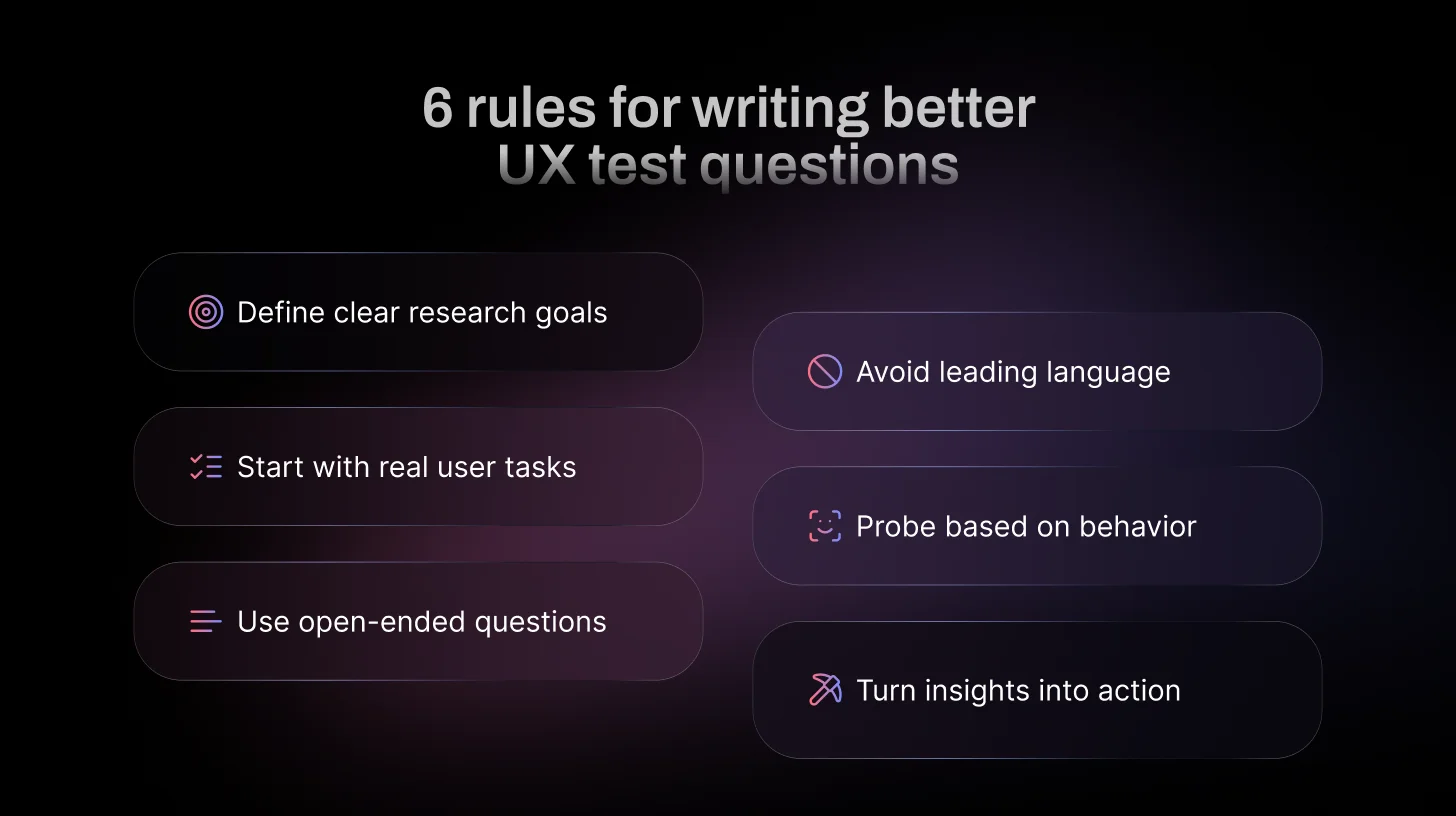
- Start with a clear research goal: Before writing any question, define exactly what you need to learn. This keeps questions focused and prevents vague or off-topic data.
- Use open-ended, neutral phrasing. Questions that can’t be answered with yes/no encourage detailed stories. Try starting with “What…”, “How…”, “Why…”, or “Tell me about…”, e.g., This draws out natural thinking without guiding the answer.
- Don’t overcomplicate or use jargon: Keep questions short, simple, and in everyday language, no internal terms or long setups. Overly complex questions confuse participants and make them overthink instead of reacting naturally.
- Focus on behavior, not opinion alone: Prioritize questions that explore what users do and why, rather than relying only on what they say they prefer.
- Avoid leading language: Leading phrasing can unintentionally influence responses and distort the accuracy of insights.
- Build questions in funnel layers: Start broad to capture expectations, then narrow based on observed behavior to uncover root causes.
- Stay aligned with usability metrics and outcomes: Strong questions should generate insights that connect to measurable improvements and product decisions.
Wrapping Up: Ask Better Questions, Build Better Products
Great user testing comes down to curiosity and clarity. Focus on realistic tasks that feel like everyday goals, encourage users to think aloud so you hear their real-time thoughts and hesitations, and ask open, neutral questions that let them reveal the why behind their actions without leading or assuming anything.
When you do this consistently, vague feedback turns into precise insights: the exact spots where trust breaks, confusion builds, or delight happens. Those revelations make fixes obvious, not debatable, leading to smoother flows, fewer drop-offs, happier users, and measurable wins like higher conversions or lower abandonment.
You don’t need huge budgets or expert teams to get there, just the right approach and the right people.
That’s exactly what TheySaid is built for. Describe your ideal testers once (demographics, behaviors, whatever fits), and we match you with vetted participants from our panel or let you bring your own list. Launch browser-based sessions with smart AI moderation, full voice plus screen recording, think-aloud prompts, and instant analysis highlight clips, patterns, and recommendations delivered fast.
Happy testing! What’s on your radar next?
FAQs
What questions should I ask in a user testing session?
You should ask open-ended, behavior-focused questions that reveal how users think and make decisions. Focus on what they do, what they expect, and where they hesitate. Avoid leading or opinion-only questions. The goal is to understand real interaction, not collect polite feedback.
How long should a user testing session last?
30–60 minutes for moderated (45–60 ideal). Unmoderated: 15–30 minutes. Longer than 60 tires users and hurts data quality.
Are user testing and usability testing the same?
Yes, in practice, they’re basically the same task-based observation of real users to improve UX. “Usability testing” is more specific to interface effectiveness; “user testing” can be broader, but most people use the terms interchangeably.
What are the best user testing questions for Mobile App Usability Tests?
These work great in moderated sessions for apps (focus on navigation, gestures, mobile-specific friction like small screens or loading).
During/after tasks:
- What are your first thoughts on this screen?
- How easy or difficult was navigating to [feature]?
- What made you tap/pause/swipe there?
- What’s confusing or frustrating about this flow?
- How does this compare to other apps you use?
- What would you change about the layout or interactions?
- How confident do you feel in completing this on your phone?
What are examples of bad user testing questions?
Bad user testing questions include leading questions, vague questions, and hypothetical scenarios that don’t reflect real behavior. Questions like “Do you like this?” or “Would you use this someday?” often produce unreliable feedback.
Can usability testing be done remotely?
Yes. Usability testing can be conducted remotely through moderated video sessions or unmoderated task-based tools. Remote testing allows teams to gather insights from users across different locations without requiring in-person sessions.






.svg)


