



If you’re a UX designer, product manager, or researcher, you already know usability testing is gold for building better products. But let’s be honest, getting users into a room (or even scheduling video calls across time zones) isn’t always simple. Tight budgets, participant dropouts, and geographic constraints can slow research down faster than expected.
Over the past few years, advances in digital collaboration tools and AI-powered user testing platforms have quietly changed that reality. It’s now possible to test products without being physically present or actively moderating every single session.
Remote usability testing lets you observe how people interact with your prototype, website, or app in their own environment. The tools can record sessions, track clicks, and surface insights automatically, often revealing behaviors you might miss in a live session.
In this blog, you’ll learn everything you need to know about remote usability testing: why it’s often the smartest choice, when to use it, how to run it successfully, and practical tips to get the most valuable insights fast.
TL;DR
Remote usability testing allows teams to test products with users online, without a physical lab.
It can be moderated (live sessions) or unmoderated (self-guided tasks).
Remote testing is faster, more scalable, and often more cost-effective than in-person research.
It works best for validating flows, identifying usability issues, and gathering early-stage feedback.
Modern usability testing tools like TheySaid make remote testing even more efficient by reducing scheduling and analysis time.
However, complex behavioral studies or sensitive research may still benefit from in-person testing.
Read: Usability Testing Methods: What They Are and When to Use Them
What is remote usability testing?
By definition, remote usability testing is a research method in which participants and the researcher or facilitator are in different locations, connected through usability testing tools like TheySaid.
Unlike traditional in-person usability testing, this approach eliminates the need for labs, travel, or synchronized schedules, making it accessible when budgets are tight or users are spread across cities, countries, or continents.
Types of remote Usability testing
Remote usability testing isn’t a single method. It’s a category of approaches that vary depending on how much control, interaction, and real-time involvement you need.
It splits into two main types:
Moderated remote usability testing
Moderated remote testing is conducted live, with a researcher guiding the participant through the session in real time.
The participant shares their screen while completing tasks, and the moderator observes behavior, asks clarifying questions, and explores moments of hesitation or confusion as they happen. This creates space for deeper qualitative insight, not just what users do, but why they do it.
Because the session is interactive, moderated testing is particularly useful for:
- Complex user flows
- Early-stage prototypes
- Exploratory research
- High-stakes product decisions
However, live facilitation requires scheduling, coordination, and active note-taking. It can also limit how many participants you’re able to test within a given timeframe.
The trade-off: richer context in exchange for more time and effort.
Unmoderated remote usability testing
Unmoderated testing drops the live moderator completely.
Participants get a clear set of tasks and instructions through a platform, then complete everything on their own schedule. The tool automatically captures screen recordings, clicks, navigation paths, task success rates, time on task, and think-aloud audio. You review it all afterward.
This approach shines when you need:
- Faster setup and deployment
- Easy scaling to more participants
- Lower costs
- Flexibility across time zones
It’s ideal for validating focused tasks or comparing design options quickly.
The catch: Less depth. Without someone there to probe, you can’t ask follow-ups in the moment. Instructions need to be crystal-clear, and the test must be designed to avoid confusion.
The trade-off: speed and scale in exchange for less real-time exploration.
Read: Moderated vs Unmoderated Usability Testing: Which Method Should You Use?

“Remote usability testing gives teams flexibility, but the real advantage is speed. When you can validate ideas without coordinating rooms, schedules, and logistics, research becomes part of the workflow — not a bottleneck.”

For a step-by-step walkthrough, see User Testing Process: Step-by-Step Guide for Product Teams (2026).
Advantages of remote usability testing
Choosing remote usability testing comes with some solid, no-brainer benefits.
Access to geographically diverse users
One of the biggest shifts remote testing enables is reach. You’re no longer limited to people who live near your office or can attend a lab session during working hours. Instead, you can recruit participants across regions, countries, and time zones in a single day.
Cost-effective research
Remote usability testing is often significantly more affordable than traditional lab studies. There’s no need to rent testing facilities, cover travel costs, or schedule full-day moderated sessions. Many remote studies can be run with just a testing platform and a group of participants, which makes it easier for smaller teams to conduct research regularly without large budgets.
Real-world usage conditions
When participants test remotely, they use their own devices, browsers, and internet connections. You’re seeing your product in the same environment where it will actually be used. While this introduces some variability, it can also surface issues like slow loading times, mobile responsiveness problems, or device-specific bugs that controlled lab environments might miss.
Faster iteration cycles
Remote studies are generally quicker to launch because there’s no need to organize physical spaces or manage in-person logistics. Once your test is ready, distribution is often as simple as sharing a link.
Easier stakeholder visibility
Another practical advantage is transparency. Remote sessions can be recorded and shared internally. Product managers, designers, and executives can observe moments of friction firsthand instead of relying on summarized notes.
Scalability for quantitative validation
Unmoderated remote testing makes larger sample sizes realistic. Because data collection is automated, you can measure usability metrics across dozens or even hundreds of participants without dramatically increasing effort. This makes remote testing especially useful for validation studies and A/B comparisons, where consistency and scale matter more than conversational depth.
Ability to test earlier in the design process
Remote usability testing makes it easier to validate ideas before significant development begins. Teams can test wireframes, clickable prototypes, or early product concepts without building a fully functional feature. Testing earlier helps identify usability issues and risky assumptions before they become expensive to fix.
Read: What Is Prototype Testing? Definition, Types & Step-by-Step Process
Run remote usability tests faster with AI
TheySaid helps teams design tests, guide participants, and analyze user behavior automatically — so you can uncover usability issues without the overhead of traditional research.
Start Testing
Disadvantages of Remote Usability Testing
Although remote usability testing provides many benefits, understanding its limitations helps teams choose the right research method and avoid unrealistic expectations.
Unclear tasks can distort results
Because participants complete tasks on their own, poorly written instructions can easily lead to misunderstandings. If a task is vague or confusing, users may follow the wrong path without realizing it. In moderated studies, a researcher can clarify instructions, but in unmoderated tests, the study design must do that work.
Limited opportunity for follow-up questions
In unmoderated sessions, researchers cannot immediately ask why a participant hesitated or chose a particular action. While recorded sessions provide valuable behavioral insights, the lack of real-time probing can make it harder to fully understand the reasoning behind certain decisions.
Less control over the testing environment
Participants complete tests in their own environments. Although this reflects real-world usage, it also introduces variability that researchers cannot fully control.
Careful planning becomes essential
Remote usability testing isn’t necessarily less work; it simply shifts where the effort goes. Instead of organizing physical labs, researchers spend more time designing clear tasks, defining study goals, and preparing the test flow.
Note
One of the challenges with unmoderated remote testing is the lack of real-time probing. AI-powered platforms such as TheySaid address this by automatically generating follow-up questions and guiding participants through structured tasks, adding depth without requiring a live moderator.
When to conduct remote usability testing?
The short answer: earlier and more often than most teams expect.
Remote usability testing isn’t something you save for the final stages of design. Because it’s faster to set up and easier to scale than in-person research, it can be integrated throughout the product lifecycle.
During Iterative Design Cycles
Short remote tests between sprints help confirm that usability is actually improving. Instead of relying on internal agreement, you get behavioral evidence.
Before Major Releases
Use remote testing as a final usability checkpoint before launch. Catching friction here protects conversion rates and reduces post-launch fixes.
When Resources Are Limited
Remote testing lowers the operational barrier to research. With the right platform, teams can launch structured tests in hours, not weeks.
A practical mindset: Rather than asking whether remote usability testing is worth doing, it’s often more effective to ask how often you can incorporate it into your workflow.
When testing becomes lightweight and repeatable, research stops being a separate phase and starts becoming part of how products are built.
Before diving into the best practices for remote usability testing, it’s helpful to hear how product leaders approach validation in modern product teams.
In the discussion below, Celeste Skyfire, Head of Product at Recidiviz, explains why testing ideas early with prototypes helps teams avoid investing months into features users may not actually need. The Fastest Way to Validate Product Ideas (Without Building Them)
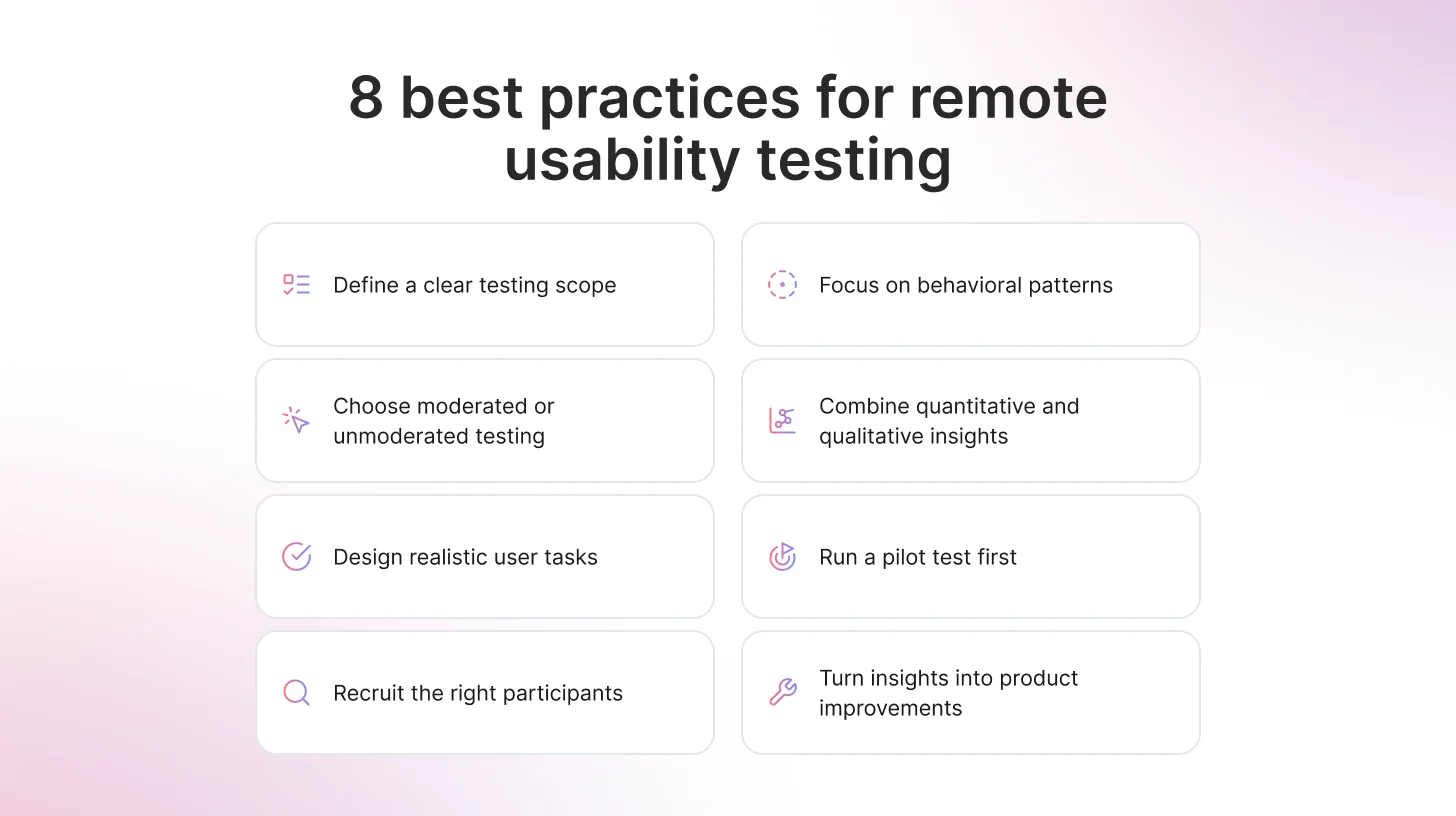
8 Best practices for remote usability testing
Here are some steps and best practices to follow to run a successful remote user testing. \
Define a scope
To start, define a clear scope. The scope of a remote user testing plays a big role in how useful the results will be. When too many flows, features, or ideas are tested at once, the feedback quickly becomes harder to interpret.
It’s tempting to try to cover everything while participants are available. But broader tests rarely produce clearer insights. In practice, focusing on one main objective tends to work much better. When a test concentrates on a single flow or question, patterns in user behavior become easier to spot and translate into design improvements.
Keeping the test short also helps participants stay engaged. This matters even more in unmoderated sessions, where people complete tasks on their own without guidance. Once a test starts to feel long or complicated, attention drops, and the quality of the data suffers.
A focused study not only improves completion rates, but it also makes the insights easier to act on. When the scope is tight, the signal becomes much clearer.
Key Takeaway
TheySaid can help structure the scope of a test by generating task flows and follow-up questions based on your product context. By providing details about your product and target users, teams can “teach” the AI what the test should focus on, making study design faster and more consistent.
Choose the Right Testing Format for the Objective
As discussed earlier, remote usability testing can be conducted in two ways: moderated or unmoderated. Each approach serves a different purpose, so choosing the right one depends on what the study is trying to uncover.
Moderated sessions are useful when a deeper understanding is needed. Because a researcher observes the session live, they can ask follow-up questions and explore moments where participants hesitate or become confused.
Unmoderated testing works differently. Participants complete tasks independently, which allows researchers to collect feedback from a larger number of users and identify broader behavioral patterns.
Neither method is universally better than the other. The most effective choice simply depends on the objective of the test. When a deeper explanation is needed, moderated sessions provide richer insight. When speed and scale matter more, unmoderated testing becomes the more practical option.
Design Tasks Around Realistic Goals
The way tasks are written can strongly influence how participants behave during a usability test. When tasks are too specific or read like instructions, people simply follow the directions instead of interacting with the product naturally.
A better approach is to frame tasks around realistic goals. This encourages participants to explore the interface the same way they would in real life, which makes their behavior far more useful to observe.
For example, instead of writing a task like:
“Click on the pricing page and choose the Pro plan.”
You might say:
“You’re considering upgrading your plan. How would you find information about pricing?”
Another example could be:
Instead of:
“Go to the help center and open the refund policy.”
Try:
“You bought something but now want to return it. Show how you would check the refund policy.”
The goal of remote usability testing isn’t to see whether people can follow prompts. It’s to understand whether the product itself communicates clearly without guidance. When tasks reflect real user intentions, the insights that come from the test are much more reliable.
Some modern testing platforms, like TheySaid, help generate structured tasks and follow-up questions automatically, making it easier to run consistent remote usability studies at scale.
Recruit Participants Who Reflect Your Real Users
It can be tempting to invite whoever is easiest to reach, especially when trying to fill a study quickly. But feedback from the wrong audience can lead to misleading conclusions. Someone unfamiliar with your product category may struggle for reasons that real customers wouldn’t.
A smaller group that closely matches your target users often produces more meaningful results than a large group that doesn’t reflect your audience. When participants share similar goals, expectations, and experience levels as your real users, behavioral patterns become easier to identify and interpret.
In practice, recruiting the right people reduces noise in the data and makes the insights far more reliable.
Focus on Behavioral Patterns, Not Isolated Opinions
Individual feedback can sometimes sound convincing, especially when a participant expresses a strong opinion about a design. But in usability testing, behavior usually tells a more reliable story.
When several participants hesitate in the same place, backtrack through the same navigation path, or repeatedly click the wrong element, those actions often point to a deeper usability issue. These patterns reveal where the interface is failing to communicate clearly.
For example, if multiple users pause on a pricing page before selecting a plan, it may signal confusion about the options. If participants repeatedly open the wrong menu while searching for a feature, the navigation structure may not match their expectations.
Looking for patterns across sessions helps teams move beyond individual opinions and focus on consistent user behavior. When the same friction point appears repeatedly, the problem becomes measurable rather than anecdotal.
Combine Quantitative and Qualitative Signals
Remote user testing provides two types of insight: measurable data and behavioral context. The most useful findings usually come from combining both.
Metrics such as task completion rate, time-on-task, and error frequency help identify where users struggle. These numbers provide a clear overview of how easily people can complete key tasks.
At the same time, recorded sessions and participant comments explain what those numbers actually mean. Watching someone hesitate before clicking a button or hearing them describe confusion about a page layout adds important context.
When behavioral observations support the metrics, conclusions become much stronger. Numbers highlight where problems occur, while qualitative feedback helps explain why they happen.
Modern usability research often blends human feedback with AI-assisted insights. AI-powered usability testing platforms like TheySaid can analyze patterns across sessions and help teams identify friction points faster.
As Jason Moore, Senior Director of UX, explains:
“AI is giving us the freedom to fail faster with less risk.”
Some teams even use synthetic users to explore early design ideas before recruiting participants.
Moore notes:
“Synthetic users helped us catch the obvious blind spots so that when I got a real human on the phone, I wasn’t wasting their time.”
Run a Pilot Before Launching the Full Study
Even well-designed tests can contain small issues that only become visible once someone actually tries them.
Running a pilot study with a small group of participants helps identify unclear instructions, confusing tasks, or technical problems before the test is widely distributed. This step is especially important for unmoderated studies, where participants complete tasks independently, and researchers cannot intervene in real time.
One common approach is to release the study in small batches. Early participants may reveal issues with wording, task flow, or navigation that can be adjusted before more users join the study.
Taking time to test the test helps ensure that the data collected reflects genuine user behavior rather than problems in the setup.
Turn Insights Into Iteration
Usability testing only becomes valuable when the findings lead to meaningful improvements. Observing friction points is just the beginning; the real goal is to refine the product based on what users experience.
When multiple participants struggle with the same step, that issue should become a clear candidate for redesign. Small adjustments to navigation, labeling, or task flow can often remove barriers that prevent users from completing their goals.
Remote usability testing works best when it becomes part of an ongoing cycle. Teams identify issues, implement improvements, and test again. Over time, these repeated feedback loops gradually strengthen the product’s usability.
When insights consistently lead to iteration, usability testing stops being a one-time activity and becomes a regular part of product development.
Test your product with real users
TheySaid uses AI to guide participants through tasks and capture insights automatically, so teams can run usability tests faster.
Try TheySaid
Recommended read: AI User Testing: The Complete Guide for Product Teams (2026
FAQs
What is remote usability testing?
Remote usability testing is a research method where participants evaluate a product or prototype from their own location using their own devices. Instead of visiting a usability lab, users complete tasks online while researchers observe behavior or collect interaction data remotely.
What are the benefits of remote usability testing?
Remote usability testing makes it easier to recruit participants, launch tests quickly, and collect feedback from users in different locations. It also reduces the logistical costs associated with lab-based research.
Because participants use their own devices and environments, remote tests can often reflect more realistic user behavior.
How many participants are needed for remote usability testing?
For qualitative usability testing, 5–8 participants are often enough to identify most usability issues. For quantitative validation studies, teams may recruit 20–50 participants or more to identify patterns and measure usability metrics reliably.
The right number depends on the research goal.
Is remote usability testing as effective as in-person testing?
Remote usability testing can be just as effective for many research goals, particularly when testing digital products such as websites or apps. It allows teams to collect feedback quickly and from a broader range of users.
However, for highly exploratory research or studies that require close observation of non-verbal behavior, in-person testing may still provide additional depth.
What tools are best for remote usability testing?
Popular tools for remote usability testing include TheySaid, which uses AI to guide participants through tasks and generate follow-up questions automatically. Maze is widely used for quick unmoderated prototype testing, while UserTesting supports moderated sessions with participant panels. Tools like Lookback are often used for live usability interviews and real-time observation.






.svg)


