



You spend three days polishing a prototype. Design signs off. Engineering builds it. Two weeks later, half your users can't find the one button that mattered most, and nobody caught it because nobody tested it before the build started. That's not a design failure. It's a testing-tool failure, and in 2026, there's no excuse for it: the right tool catches that exact problem in minutes, before a single line of code gets written.
TL;DR
Choosing the best prototype testing tools in 2026 comes down to one real question: do you need click data, AI-moderated depth, or both? TheySaid is the only platform built to give you everything at once: screen and voice recording, live AI follow-up questions, Synthetic Testers for pre-recruitment checks, and validation embedded directly inside Claude Design, v0, Bolt, and Lovable so you can test a prototype the moment it's built, not after. Every tool below gets a real process walkthrough, its top features, and where it applies an honest limitation.
What actually happens when you test a prototype badly
Prototyping has stopped being a design-only activity. Per Figma's own State of Design 2026 research, 60% of Figma files created in the last year were built by non-designers. PMs, engineers, and founders are now shipping clickable prototypes as routine, not as a special design deliverable. More people building prototypes means more prototypes that never get properly tested before a team commits engineering time to them.
The payoff for testing anyway is measurable: companies that invest in validated user research and usability testing are 1.9x more likely to report improved customer satisfaction scores than teams that rely on guesswork.
Test prototypes the moment they're built right inside Claude Design, v0, Bolt, and Lovable.
Book a demo
What to look for when choosing the best prototype testing tool
Not every team needs the same thing from a prototype testing tool, but these five criteria separate the tools that actually solve your problem from the ones that just look similar on a features page:
Design-tool integration
Does it accept a live Figma prototype link with full click-through interactivity, or does it only work with static screenshots? This is the difference between testing how your product actually flows and testing a slideshow.
Recording depth
Screen recording alone shows you where someone clicked. Screen and voice together show you why there's hesitation, the confusion, the moment someone talks themselves into the wrong choice. If you only get one, you're missing half the story.
Moderation style
Does the AI ask adaptive follow-up questions live, the way a skilled researcher would, or does it just summarize a recording after the fact? Live moderation catches the specific reason behind a struggle. After-the-fact summarization catches that a struggle happened, and not much more.
Participant access
A built-in panel gets you speed. Bringing your own users gets you accuracy feedback from people who actually resemble your real customer base instead of professional testers who've done fifty studies this month. The best tools let you do either.
Barrier to participation
Every extra step a download, an app install, a plugin— is a chance for a participant to give up before they even start. Browser-only, click-and-go testing consistently gets higher completion rates than anything requiring setup.
Speed to insight
How long between “the test is live” and “we know what to fix”? Manual video review can stretch a simple test into a week-long project. AI synthesis can compress that same test into an afternoon.
10 Prototype Testing Tools Compared
Here's the lineup, what each tool's actually good at, where it falls short, and how to run a test with it.
1. TheySaid
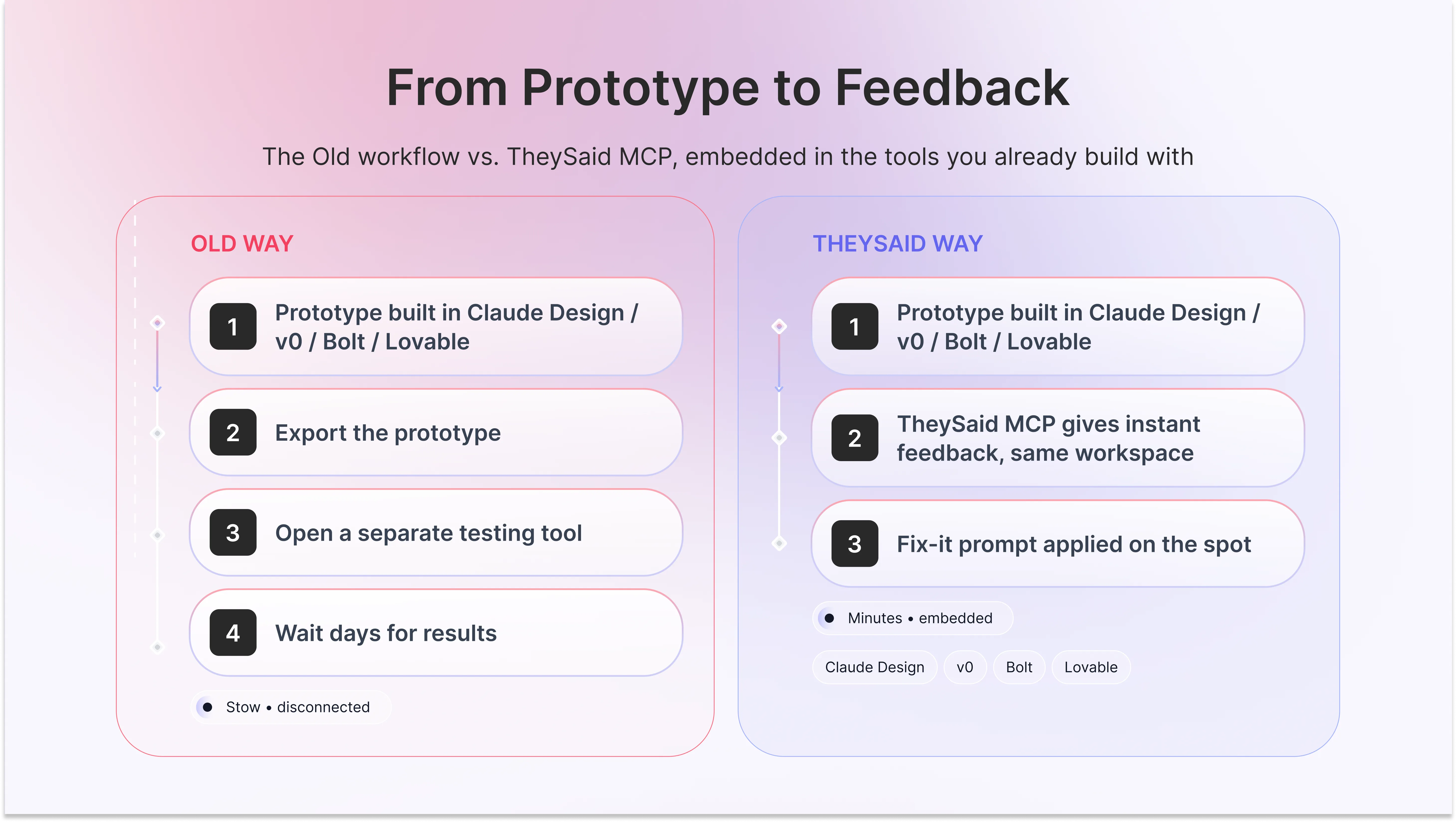
TheySaid is built to be the fastest path from “prototype exists” to “we know if it works,” and it's the only platform on this list doing it from three angles at once: instant feedback embedded directly inside Claude Design, v0, Bolt, and Lovable while the prototype is still being built; Synthetic Testers for a same-minute directional check before real recruitment; and full screen-and-voice recording with live AI-moderated follow-up questions once real users are testing.
Here’s how to test a prototype with TheySaid
1. Paste your Figma prototype link, or work directly inside Claude Design, v0, Bolt, or Lovable via TheySaid MCP for instant in-workflow feedback
2. Run a quick Synthetic Testers pass for an immediate directional read, if you want a first check before recruiting real users
3. Share your test link through email, a website popup, QR code, or social or pull from TheySaid's panel
4. Watch AI moderate each session live, asking follow-up questions in the moment a participant hesitates
5. Review AI-synthesized findings, patterns, friction points, and severity typically within hours, not weeks
Top Features
- TheySaid MCP instant feedback inside Claude Design, v0, Replit, Bolt, and Lovable
- Synthetic Testers: configurable AI personas for pre-recruitment validation
- Screen + voice recording with live AI-moderated follow-up questions
- No-download, browser-only participant experience
- Recruit your own users or draw from a 5M+ participant panel
- 70+ language support
2. Maze
The most established name specifically for Figma-based usability testing, with fast, unmoderated click and task-completion metrics. Its AI moderation capability exists but sits on higher-tier plans rather than the core product.
Here’s how to test a prototype with maze
1. Import your Figma file via Maze's one-click integration
2. Define tasks and success criteria for testers to complete
3. Share the test link or recruit from Maze's panel
4. Review click heatmaps, misclick rates, and completion metrics as results come in
Top Features
- Deep native Figma import
- Click heatmaps and path analysis
- Task success/completion rate metrics
- AI Moderator (higher-tier add-on)
3. Useberry
Strong, detailed click-path and heatmap analysis on high-fidelity Figma and Adobe XD prototypes specifically. The analysis stays quantitative there's no built-in AI-moderated interview layer.
Here’s how to test a prototype with useberry
1. Import your Figma or Adobe XD prototype directly
2. Set up flows and screens you want tracked
3. Distribute the test link to your participants
4. Review click-path visualizations and heatmap data
Top Features
- Direct Figma and Adobe XD import
- Click-path and heatmap visualization
- Screen-flow analytics
4. UXtweak
A broader UX research suite that includes prototype testing alongside tree testing and card sorting, useful for teams standardizing on one platform across multiple research methods.
Here’s how to test a prototype with UXtweak
1. Upload your prototype or connect via Figma link
2. Choose your testing method (usability test, tree test, card sort)
3. Recruit participants from UXtweak's panel or your own list
4. Review session recordings and generated reports
Top Features
- Multiple research methods in one suite
- Figma prototype support
- Tree testing and card sorting alongside usability tests
5. Hubble
Covers prototype tests, surveys, and in-product intercepts from one study builder with direct Figma support. Built more for breadth across research methods than depth on prototype testing specifically.
Here’s how to test a prototype with hubble
1. Create a study and connect your Figma prototype
2. Configure tasks and screening questions
3. Launch to Hubble's panel or your own participants
4. Review session data through the study dashboard
Top Features
- Study builder covering multiple research types
- Direct Figma prototype support
- In-product intercepts alongside standalone tests
6. Lyssna
A fast, inexpensive option with a built-in panel, well suited to early first-click and preference tests. Not built for multi-step task flows or sustained moderated depth.
Here’s how to test a prototype with lyssna
1. Upload prototype screens or connect your Figma file
2. Choose a test type first-click, preference, or five-second test
3. Launch to Lyssna's built-in panel
4. Review results in the dashboard, typically within hours
Top Features
- Built-in participant panel
- First-click and five-second test formats
- Fast turnaround, startup-friendly pricing
7. Userlytics
A globally established name combining a large human panel with behavioral analytics, moderated and unmoderated testing from one platform, with worldwide participant recruiting.
Here’s how to test a prototype with userlytics
1. Upload your prototype or provide a link
2. Choose moderated or unmoderated methodology
3. Recruit from Userlytics' global panel by demographic targeting
4. Review session recordings alongside behavioral analytics data
Top Features
- Large global participant panel
- Moderated and unmoderated methods in one platform
- Behavioral analytics alongside session recordings
8. Loop11
Built for structured, task-based UX benchmarking, clean quantitative metrics for teams that want to track usability performance over time.
Here’s how to test a prototype with loop11
1. Define tasks and success paths for your prototype
2. Launch to Loop11's panel or your own participants
3. Track completion rates and time-on-task by segment
4. Benchmark results against prior rounds of testing
Top Features
- Task-based benchmarking with historical comparison
- Clean quantitative usability metrics
- Segment-level performance tracking
9. UserTesting
The longest-established name in the category, with a large pre-recruited panel and deep, moderated video research capability. Remains video-first at its core.
Here’s how to test a prototype with usertesting,com
1. Upload your prototype or provide a link
2. Write a test script with tasks and questions
3. Recruit from UserTesting's panel by demographic criteria
4. Review video recordings, with AI-assisted summaries available
Top Features
- Large, established participant panel
- Deep moderated and unmoderated video research
- AI-assisted session summaries
10. PlaybookUX
Pairs unmoderated prototype testing with a strong AI synthesis and transcription layer a solid middle ground between basic click tools and full enterprise platforms.
Here’s how to test a prototype with PlaybookUX
1. Upload your prototype and define test tasks
2. Launch unmoderated to PlaybookUX's panel or your own users
3. AI transcribes and synthesizes session recordings automatically
4. Review synthesized themes and individual session clips
Top Features
- Unmoderated testing with AI-driven synthesis
- Automatic transcription of sessions
- Mid-range pricing between basic tools and enterprise platforms
Full feature comparison
Pricing snapshot
Mistakes teams actually make when choosing a prototype testing tool
- Picking by brand recognition instead of workflow fit the most famous name isn't automatically the right one for a 3-person team versus a 300-person org.
- Assuming “AI-moderated” is included when it's actually a paid add-on confirm this before comparing prices, since it changes the real cost significantly for tools like Maze.
- Requiring a download or app install without realizing it lowers completion rates — every extra step loses participants who'd otherwise finish the test.
- Waiting for a “finished” design before testing — low-fidelity wireframes catch navigation and flow problems just as well, earlier and cheaper.
- Testing with professional panel testers who don't resemble the actual target customer, instead of bringing real or realistic users into the test.
- Choosing a tool that doesn't integrate with where the prototype actually lives a team building in v0 or Bolt gets far less value from a Figma-only tool.
Whichprototype testing tool should you actually pick?
Here's what actually fits, by team type:
Solo designer or freelancer: Theysaid, Lyssna or PlaybookUX. Cheap, fast, built-in panel, no setup overhead for a one-person workflow.
Early-stage startup (pre-seed to Series A): TheySaid. Free to start, no research background required to run or read a test, and it scales as the team grows instead of needing a re-platform later.
Team building fast with AI tools: TheySaid. It's the only platform on this list with native MCP embedding every other tool requires exporting the prototype first.
Mid-size product team with an established design system: Maze, Useberry or TheySaid. Deepest native Figma integration if quantitative click data is the main need.
Agency testing multiple client prototypes: TheySaid, Hubble, or UXtweak. Flexible enough to run several research methods across different client accounts from one workspace.
Enterprise with a dedicated UX research org and existing panel budget: TheySaid, UserTesting or Userlytics. Large established panels and a research process that's already built for that scale.
Teams tracking usability performance over time: Loop11. Built specifically for repeatable, comparable task benchmarks round over round.
Test your prototype at the pace of AI building.
AI made building a prototype a five-minute job. TheySaid makes finding out if it actually works a five-minute job too: AI-moderated testing, Synthetic Testers, and instant feedback right inside Claude Design, v0, Bolt, and Lovable. No exporting, no separate tool, no waiting until Friday's standup to know if it's broken.
Start Testing Free!.png)
FAQ
What types of prototypes can be tested?
Any web-accessible clickable prototype, including Figma prototypes shared by link, and with TheySaid specifically prototypes built directly in Claude Design, v0, Bolt, or Lovable.
How many users should test a prototype?
Estimates vary by source: a widely cited figure is roughly 5-7 participants per audience segment to catch 80-85% of major usability issues, though teams testing broader audiences often plan for more, closer to 15-20 sessions.
Do participants need to download anything to test a prototype?
Not with browser-based platforms a participant clicks a link and starts immediately.
Can AI test a prototype without real users at all?
AI-simulated personas like Synthetic Testers give an early, directional read useful before real recruitment paired with real-user testing for deeper validation.
Can I test a prototype built in an AI tool like v0 or Bolt directly?
Yes, TheySaid MCP gives instant feedback inside Claude Design, v0, Replit, Bolt, and Lovable directly, so a prototype can be validated in the same workspace it was built in.
Moderated vs. unmoderated which is better for prototype testing?
Moderated (live-guided, whether by a human or AI) gives real-time depth through follow-up questions; unmoderated scales further and captures more natural, unobserved behavior.
Are there free prototype testing tools?
Yes, several platforms on this list, including TheySaid and Lyssna, offer a free plan or trial before requiring a paid tier, which is usually enough to run a first real test and see if the workflow fits your team.
How much does prototype testing cost?
It ranges widely: budget-focused tools start under $100/month, mid-range suites sit in the low hundreds monthly, and enterprise platforms like UserTesting typically start in the five-figure annual range. TheySaid's entry tier is free.
What's the best way to test a prototype at each design stage?
Low-fidelity wireframes are best for testing navigation and information architecture — can people find what they're looking for? High-fidelity, near-final prototypes are better for testing detailed interactions, visual clarity, and copy. Testing too early on a polished prototype wastes design effort; testing too late on a rough wireframe wastes everyone's time on fixable-later details.
Related Reading
● TheySaid Prototype Usability Testing (product page)
● What Is Prototype Testing? Definition, Types & Step-by-Step Process
● What is a Synthetic Persona? Complete Guide


.svg)


