



.png)
TL;DR
The best time to do usability testing is earlier than you think and more often than you’re doing it.
The 1-10-100 rule: a problem costs $1 to catch early, $10 in development, and $100+ after launch.
Most teams test at one stage. High-performing teams test at every stage.
AI-native platforms like TheySaid make testing continuous, not a calendar event you schedule between sprints.
You’ve shipped a feature. Adoption is flat. Support tickets are piling up around the same interaction point. The team is pointing fingers at the copy, the design, and the onboarding sequence.
The real issue? Nobody tested it with real users before it went live.
That scenario plays out on product teams every week, not because people don’t believe in usability testing, but because the question of when to do it never gets a clean answer. There’s always a reason to push it to the next sprint.
This guide is the clean answer. It covers every stage of the product lifecycle where usability testing has the highest impact, what kind of testing fits where, and how AI is changing the calculus entirely for PMs, designers, and UX researchers who need signal fast.
The 1-10-100 rule: why timing is everything
If you remember one thing from this guide, make it this.
A usability problem caught during early design costs roughly $1 to fix. The same problem caught during development costs $10. After launch, with real users already hitting it? $100 or more.
The math is brutal. But most product teams still run usability testing as a single pre-launch checkpoint, one gate, not an ongoing practice. That means they’re consistently solving $1 problems at $100.
For PMs, that’s rework eating into sprint capacity. For designers, it’s revisiting decisions that felt locked. For UX researchers, it’s the constant fight to get research on the calendar before the build is already done.
The fix isn’t a bigger research budget. It’s testing earlier, more often, and at the right stage for the question you’re actually trying to answer.
Usability testing stages: a quick-reference guide
Different stages need different methods. Here’s how it maps:
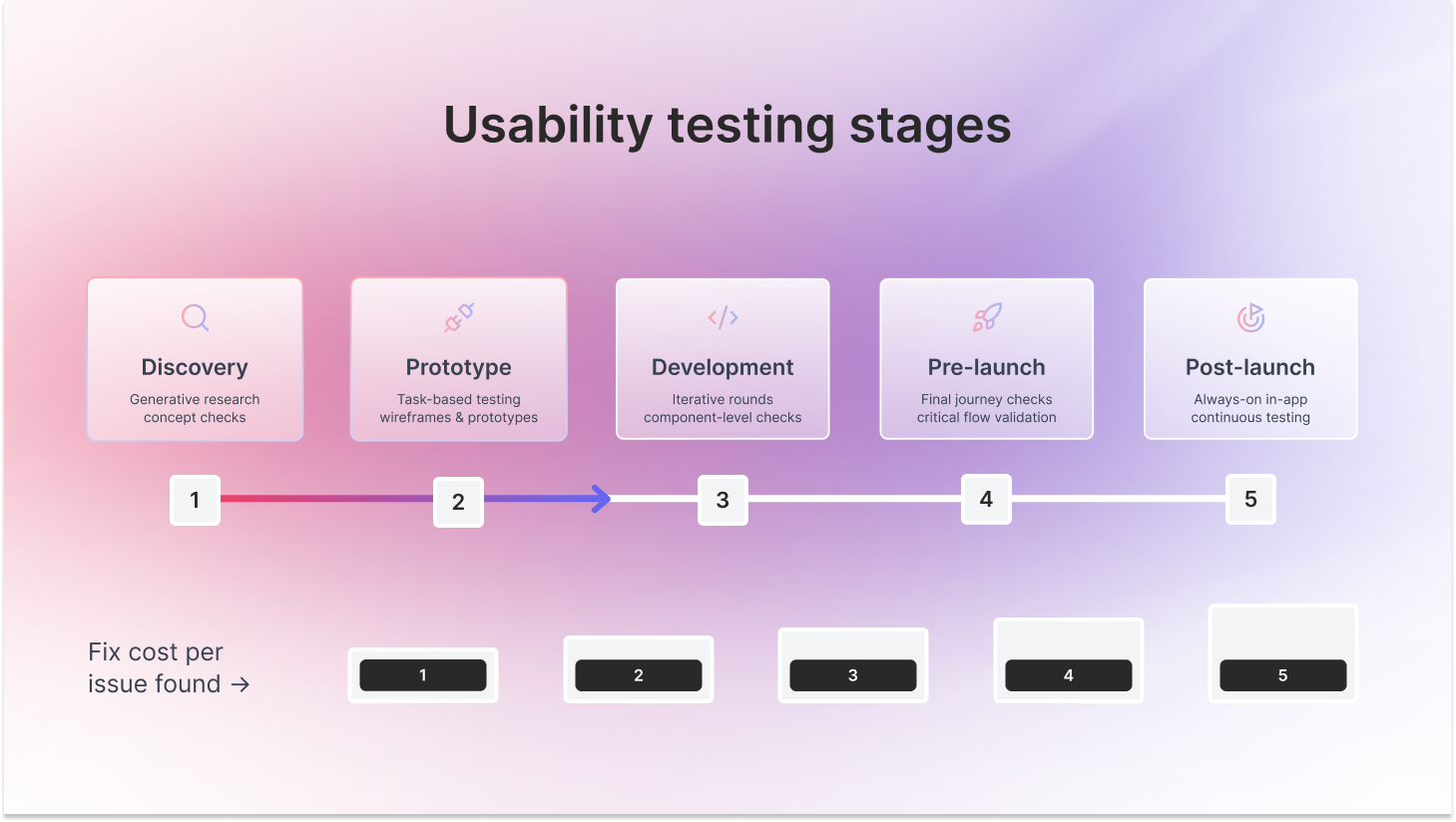
Stage 1: usability testing during discovery
This is the stage most teams skip. And it’s where they pay the most for it.
When a project kicks off, the instinct is to move fast, sketch something, get it in front of stakeholders, and start building. Usability testing feels like it belongs later, when there’s something real to test.
It doesn’t.
Discovery testing isn’t about evaluating a design. It’s about checking whether you’re solving the right problem before you commit resources to solving it.
If you’re starting a new product or feature, test a competitor product, a rough sketch, or a paper prototype. Watch whether users understand the core idea. See if the basic path makes sense. You’re not looking for polish, you’re looking for signal.
If you’re in a redesign, test the current version first. Where do users get stuck? What do they ignore? What do they expect to happen that isn’t happening? Build your problem map before you build solutions.
Good discovery testing starts with the right questions. Go in asking:
- What problem are users actually trying to solve here, in their own words?
- How are they handling this today, and what frustrates them about it?
- Does this concept make sense to them without any explanation from us?
- What would make them trust this enough to try it?
- What would have to be true for this to replace what they’re already doing?
For UX researchers, this is where your impact is highest, and your seat at the table is most often missing. Getting a usability test into discovery, even a lightweight one, changes the quality of every decision that follows.
Stage 2: usability testing during prototype and concept development
This is where usability testing becomes evaluative. You’ve defined the problem. You have something to show. Now the question shifts: can users actually use what you’re building?
Start with low-fidelity wireframes. These are cheap to test and even cheaper to fix. Users give you unfiltered feedback on structure and flow without getting distracted by visual details. For designers, this is the stage where early testing saves the most rework.
As fidelity increases, move to prototype testing with clickable high-fidelity designs. Users respond more naturally here, which gives you more realistic data on task completion, friction, and the gap between what you designed and what users expect.
Three questions this stage needs to answer:
- What percentage of users complete the core task without help?
- Where do they hesitate, backtrack, or click the wrong thing?
- Does the information architecture match how users think about the problem?
TheySaid’s AI moderator guides users through tasks, probes when it detects hesitation, and generates insight summaries across all sessions automatically. You get qualitative depth without running every session yourself.
Stage 3: usability testing during development
Here’s what most teams get wrong about development testing: they treat it as a one-time QA checkpoint instead of an iterative practice.
The product is becoming real. Early rounds should focus on whether users navigate the core flows. Later rounds focus on detail. Do labels make sense? Do error states communicate clearly?
The teams that catch the most problems run short rounds throughout the sprint. Test a specific component. Fix what’s broken. Test again before moving on.
The questions change as you progress through the build. In early rounds, ask:
- Can users understand the core flow without explanation?
- Where do users hesitate or take an unexpected path?
- What do users expect to happen next, and does the design deliver it?
- Which labels, steps, or screens feel unclear or confusing?
In later rounds, once the build is more complete, shift to:
- Can users complete the task efficiently, not just successfully?
- Do users recover easily if they make a mistake?
- Does the experience feel consistent from start to finish?
- Where does the interaction still create friction as more features are added?
For PMs, this is where unmoderated usability testing earns its keep. A well-designed test can be live in an afternoon and return results within 24 hours. That’s fast enough to inform the next sprint planning session, not the one three weeks from now.
Stage 4: pre-launch usability testing
You’re almost there. This is your last real chance to catch friction before users do at scale, without the ability to pull it back.
The near-final product should feel complete. Your job isn’t to redesign it. It’s to find anything that seems finished but breaks the experience: a label users misread, a step they consistently skip, a flow that makes sense in isolation but falls apart in sequence.
Focus on critical user journeys. The paths that drive activation, conversion, or retention. These are the flows where friction is most expensive to leave unfixed.
Before you ship, get answers to these:
- Can users complete the primary task end-to-end without any help?
- Are there any moments where users stop and wonder if they did something wrong?
- Does the copy on every key screen actually tell users what they need to know?
- What happens when a user makes a mistake — do they recover, or do they abandon?
- If a user lands on this for the first time with no context, does it make sense?
One practical frame for PMs: if your primary task completion rate is under 80% in testing, the product isn’t ready. That number will be lower in production.
Stage 5: post-launch usability testing
Launching isn’t the end of usability testing. It’s when you finally see how the design holds up in conditions you couldn’t fully replicate before.
Analytics show you where users drop off. Usability testing shows you why. The combination is what makes post-launch research valuable—behavioral data sets the agenda, and usability sessions investigate the cause.
What to look for after launch:
- Flows where the drop-off is higher than your prototype tests predicted
- Features with low adoption despite high visibility in the UI
- Support tickets clustering around the same interaction points
- Real-world behaviors that diverge from what you observed in testing
The moments most teams miss: high-risk, low-certainty situations
Beyond lifecycle stages, there are specific situations that demand usability testing regardless of where you are in the product calendar. The signal: high potential impact, low certainty about the outcome.
Run usability testing immediately when you’re:
- Changing onboarding, the highest-stakes flow in most products
- Redesigning core navigation or replacing a familiar pattern
- Updating pricing in a way that affects how users perceive value
- Rolling out an AI-powered feature where user mental models are still forming
- Entering a new market where existing research may not transfer
- Making decisions primarily based on internal opinion, not behavioral data
Before committing to any high-risk change, get clear on:
- What are we assuming users will understand here — and have we actually tested that assumption?
- Which user segment is most likely to be confused or disrupted by this change?
- If this assumption turns out to be wrong, what does the fix cost us in time and credibility?
- Where in this flow could a user hesitate, choose the wrong path, or abandon entirely?
- What would we need to see in testing to feel confident enough to ship this?
In these situations, speed matters as much as depth. AI interviews can return a signal in hours before the decision window closes, and the build is already locked

How AI changes when you can do usability testing
Traditional usability testing had a scheduling problem. Recruiting participants, briefing moderators, running sessions, reviewing recordings, synthesizing insights—that whole cycle took days or weeks. By the time findings arrived, the sprint had moved on.
That’s why testing stayed milestone-based. Not because teams didn’t want continuous insights, but because continuous testing wasn’t operationally possible.
AI flips this. With TheySaid:
- No scheduling. AI moderates sessions 24/7 across time zones. Users join from a link, QR code, or in-app prompt.
- No synthesis backlog. Issues are grouped by severity automatically. Clips are created. You can query your full dataset in plain language: “What’s causing drop-off at step 3 for enterprise users?”
- No panel bias. Recruit your actual customers, not professional testers who’ve learned how to behave in sessions.
- No gate-keeping. Always-on in-app testing fires when real users hit defined triggers. Testing happens whether or not anyone planned a study.
For UX researchers, this means less time on logistics and more time on the thinking that actually requires a human. For PMs and designers, it means research arrives while decisions are still reversible, not after the build is done.
The teams using TheySaid consistently say the same thing: the barrier to testing more wasn’t belief in research. It was the overhead of running it. Remove that, and testing happens at every stage.

What if you have limited time or budget?
The question isn’t whether you can afford to do usability testing. It’s whether you can afford not to.
A failed launch, a confused onboarding flow, a pricing page nobody understands—those are expensive. The research that would have caught them usually costs a fraction of the rework.
That said, not every test needs to be a formal study. Match the method to your question and your constraints:
- Guerrilla usability testing is zero-cost and same-day. Great for early-stage directional feedback on a concept. Not right for niche audiences or high-stakes decisions.
- Unmoderated usability testing scales cheaply. 5–8 participants, live in an afternoon, results the same day. The workhorse method for most validation work.
- AI-moderated sessions (TheySaid) remove the facilitation overhead entirely. You get the qualitative depth of moderated research at unmoderated speed and cost. The AI probes when users hesitate—so you get the “why”, not just the behavior.
The teams that test the most aren’t the ones with the biggest research budgets. They’re the ones who’ve removed the friction. Increasingly, that means AI.
The best time to test is right now
The teams that build research into every release, decision, and experiment end up with products that fit the market and keep users engaged. Not because they have bigger research budgets. Because they made testing a continuous habit instead of a periodic event.
TheySaid is built for that kind of continuous research. It brings recruiting, testing, and analysis together in one platform so PMs, designers, and UX researchers can keep running usability tests, concept checks, surveys, and interview studies at the pace of product development. Not the pace of the research calendar.
With AI handling the repetitive work, transcription, tagging, synthesis, and severity ranking, your team focuses on the judgment calls that actually require a human. Deciding what the pattern means. Knowing which finding to act on first. Telling the story that gets the fix prioritized.
Continuous research with TheySaid is a loop: release, test, learn, and improve. It runs at the speed your product moves. And it starts the moment a real user touches what you’ve built.
Start your first test free → theysaid.io
Frequently asked questions about when to do usability testing
When should you start usability testing in a project?
As early as you have something to test—even a rough sketch or a competitor product- it works in discovery. The earlier you catch problems, the cheaper they are to fix. Teams that wait until pre-launch are consistently solving $1 problems at $100.
How often should you run usability testing?
There’s no fixed cadence that’s right for every team. A more useful frame: test at every meaningful decision point. Stage gates (discovery, prototype, pre-launch, post-launch) plus any high-stakes, low-certainty moment—major redesigns, onboarding changes, new flows. AI-native platforms make continuous testing practical by removing scheduling and synthesis overhead.
Should you do usability testing before or after development?
Both, but the format differs. Before development, test prototypes to catch structural problems while they’re cheap to fix. During and after development, test near-final and live products to catch friction that only surfaces in a real environment. Most teams under-test before development and over-rely on post-launch data.
How many users do you need for usability testing?
For qualitative testing, 5–8 participants per round is usually enough to surface the most significant issues in a given flow. For higher-stakes decisions—onboarding, payment flows, enterprise workflows—increase to 15–20 or run multiple rounds with different segments. For statistical validation, unmoderated testing with 30–50+ participants gives you the sample size you need.
Can you run usability testing on a live product after launch?
Yes, and you should. Post-launch testing surfaces issues that earlier research couldn’t—behaviors that only emerge in real-world conditions, at real scale, on real devices. With always-on in-app testing, you don’t need to plan a new study every time. The product tests itself continuously.
What is the best usability testing method for each stage?
Discovery: generative interviews and concept checks. Prototype: task-based unmoderated testing or moderated sessions with think-aloud. Development: iterative unmoderated tests on specific flows. Pre-launch: moderated sessions on critical journeys. Post-launch: in-app triggered testing combined with analytics. High-risk moments: fast unmoderated tests backed by AI-moderated sessions for depth.

.svg)


